Anatomy of a Frame — The Complete Lifecycle of suckless-ogl
Posted on Sun 29 March 2026 in Development
Anatomy of a Frame: The Complete Lifecycle of suckless-ogl
From main() to photons on screen — a full deep-dive into a modern OpenGL PBR engine written in C.
Introduction
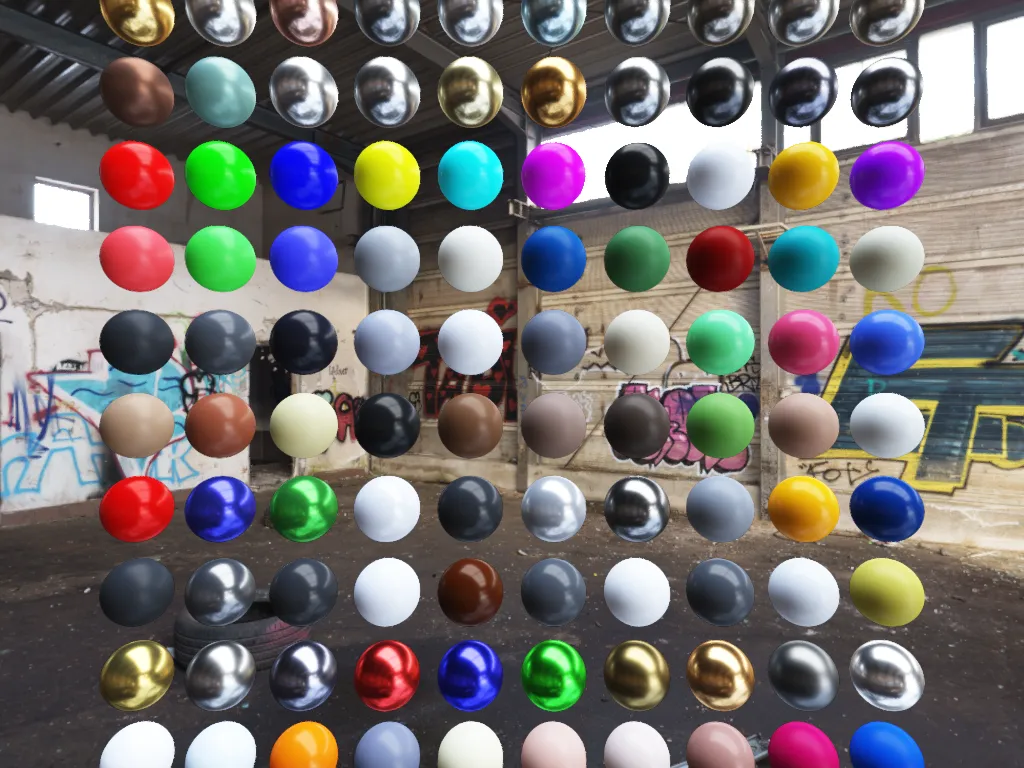
suckless-ogl is a minimalist, high-performance PBR (Physically-Based Rendering) engine written in C11 with OpenGL 4.4 Core Profile. It displays a grid of 100 spheres with varied materials (metals, dielectrics, paints, organics…) lit by Image-Based Lighting (IBL), with a full post-processing pipeline: bloom, depth of field, motion blur, FXAA, tone mapping, color grading…
This article traces the complete lifecycle of the application: from the first byte allocated in main() to the moment the GPU presents the first fully-lit frame on screen. We'll walk through every layer — CPU memory, GPU resources, the X11/GLFW windowing handshake, OpenGL context creation, shader compilation, async texture loading, and the multi-pass rendering architecture that produces each frame.
What We'll Cover
Chapter 1 — The Entry Point
Everything begins in main() (src/main.c):
int main(int argc, char* argv[])
{
    tracy_manager_init_global();          // 1. Profiler bootstrap

    CliAction action = cli_handle_args(argc, argv);  // 2. CLI parsing
    if (action == CLI_ACTION_EXIT_SUCCESS) return EXIT_SUCCESS;
    if (action == CLI_ACTION_EXIT_FAILURE) return EXIT_FAILURE;

    // 3. SIMD-aligned allocation of the App structure
    App* app = (App*)platform_aligned_alloc(sizeof(App), SIMD_ALIGNMENT);
    *app = (App){0};

    // 4. Full initialization
    if (!app_init(app, WINDOW_WIDTH, WINDOW_HEIGHT, "Icosphere Phong"))
        { app_cleanup(app); platform_aligned_free(app); return EXIT_FAILURE; }

    // 5. Main loop
    app_run(app);

    // 6. Cleanup
    app_cleanup(app);
    platform_aligned_free(app);
    return EXIT_SUCCESS;
}
The design is intentionally simple — all complexity is encapsulated in app_init() → app_run() → app_cleanup().
Design Decisions
| Decision | Why? |
|---|---|
| SIMD-aligned allocation | The App struct contains mat4/vec3 fields (via cglm) that benefit from 16-byte alignment for SSE/NEON vectorization |
Zero-init {0} |
Deterministic state — every pointer starts NULL, every flag starts 0 |
| Tracy first | The profiler must be initialized before all other subsystems to capture the full timeline |
Single App struct |
All application state lives in one contiguous allocation — cache-friendly, easy to pass around |
graph TD
    A("🚀 main()") --> B("app_init()")
    B --> B1("Window + OpenGL Context")
    B --> B2("Camera & Input")
    B --> B3("Scene — GPU Resources")
    B --> B4("Async Loader Thread")
    B --> B5("Post-Processing Pipeline")
    B --> B6("Profiling Systems")
    B1 & B2 & B3 & B4 & B5 & B6 --> C("app_run() — Main Loop")
    C --> C1("Poll Events")
    C1 --> C2("Camera Physics")
    C2 --> C3("renderer_draw_frame()")
    C3 --> C4("SwapBuffers")
    C4 -->|"next frame"| C1
    C --> D("app_cleanup()")
    D --> E("🏁 End")

    classDef entryExit fill:#fce4ec,stroke:#c2185b,stroke-width:2.5px,color:#2d2d2d
    classDef keyFunc fill:#fff59d,stroke:#f9a825,stroke-width:2px,color:#2d2d2d
    classDef subsystem fill:#ffffff,stroke:#aaaaaa,stroke-width:1.5px,color:#444444
    classDef loopNode fill:#e3f2fd,stroke:#42a5f5,stroke-width:1.5px,color:#2d2d2d

    class A,E entryExit
    class B,C,D keyFunc
    class B1,B2,B3,B4,B5,B6 subsystem
    class C1,C2,C3,C4 loopNode
Chapter 2 — Opening a Window (GLFW + X11 + OpenGL)
The first real work happens in window_create() (src/window.c).
2.1 — GLFW Initialization and Window Hints
glfwInit();
glfwWindowHint(GLFW_CONTEXT_VERSION_MAJOR, 4);
glfwWindowHint(GLFW_CONTEXT_VERSION_MINOR, 4);          // OpenGL 4.4
glfwWindowHint(GLFW_OPENGL_PROFILE, GLFW_OPENGL_CORE_PROFILE);
glfwWindowHint(GLFW_OPENGL_DEBUG_CONTEXT, GL_TRUE);     // Debug messages
glfwWindowHint(GLFW_SAMPLES, DEFAULT_SAMPLES);           // MSAA = 1 (off)
Behind the scenes, GLFW performs a full X11 handshake:
sequenceDiagram
    participant App as Application
    participant GLFW as GLFW
    participant X11 as X11 Server
    participant Mesa as Mesa/GPU Driver
    participant GPU as GPU

    App->>GLFW: glfwInit()
    GLFW->>X11: XOpenDisplay()
    X11-->>GLFW: Display* (connection)

    App->>GLFW: glfwCreateWindow(1920, 1080)
    GLFW->>X11: XCreateWindow() + GLX setup
    X11->>Mesa: glXCreateContextAttribsARB(4.4 Core, Debug)
    Mesa->>GPU: Allocate command buffer + context state
    Mesa-->>X11: GLXContext
    X11-->>GLFW: Window + Context ready

    App->>GLFW: glfwMakeContextCurrent()
    GLFW->>Mesa: glXMakeCurrent()
    Mesa->>GPU: Bind context to calling thread
2.2 — GLAD: Loading OpenGL Function Pointers
gladLoadGLLoader((GLADloadproc)glfwGetProcAddress);
OpenGL is not a library in the traditional sense — it's a specification. The actual function addresses live inside the GPU driver (Mesa, NVIDIA, AMD). GLAD queries each address at runtime via glXGetProcAddress and populates a function pointer table. After this call, glCreateShader, glDispatchCompute, etc. become usable.
2.3 — OpenGL Debug Context
setup_opengl_debug();
This enables GL_DEBUG_OUTPUT_SYNCHRONOUS and registers a callback that intercepts every GL error, warning, and performance hint. A hash table deduplicates messages (log only first occurrence).
2.4 — Input Capture and VSync
glfwSwapInterval(0);                    // VSync OFF — unlimited FPS
glfwSetInputMode(app->window, GLFW_CURSOR, GLFW_CURSOR_DISABLED);  // FPS-style
The cursor is captured in relative mode — mouse movements produce delta offsets for orbit camera control.
Chapter 3 — CPU-Side Initialization
Before touching the GPU, several CPU-side systems are bootstrapped.
3.1 — The Orbit Camera
camera_init(&app->camera, 20.0F, -90.0F, 0.0F);
The camera starts at:
- Distance: 20 units from the origin
- Yaw: −90° (looking along −Z)
- Pitch: 0° (horizon level)
- FOV: 60° vertical
- Z-clip: [0.1, 1000.0]
It uses a fixed-timestep physics model (60 Hz) with exponential smoothing for rotation:
graph LR
    subgraph "Camera Update Pipeline"
        A("Mouse Delta") -->|"EMA filter"| B("yaw_target / pitch_target")
        B -->|"Lerp α=0.1"| C("yaw / pitch (smoothed)")
        C --> D("camera_update_vectors()")
        D --> E("front, right, up vectors")
        E --> F("View Matrix (lookAt)")
    end

    subgraph "Physics (Fixed 60Hz)"
        G("WASD Keys") --> H("Target Velocity")
        H -->|"acceleration × dt"| I("Current Velocity")
        I -->|"friction"| J("Position += vel × dt")
        J --> K("Head bobbing (sine wave)")
    end

    classDef keyFunc fill:#fff59d,stroke:#f9a825,stroke-width:2px,color:#2d2d2d
    classDef subsystem fill:#ffffff,stroke:#aaaaaa,stroke-width:1.5px,color:#444444
    classDef loopNode fill:#e3f2fd,stroke:#42a5f5,stroke-width:1.5px,color:#2d2d2d

    class D,F keyFunc
    class A,B,C,E subsystem
    class G,H,I,J,K loopNode
3.2 — Async Loader Thread
app->async_loader = async_loader_create(&app->tracy_mgr);
A dedicated POSIX thread is spawned for background I/O. It sleeps on a condition variable (pthread_cond_wait) until work is queued. This prevents disk reads from stalling the render loop.
stateDiagram-v2
    [*] --> IDLE
    IDLE --> PENDING: async_loader_request()
    PENDING --> LOADING: Worker wakes up
    LOADING --> WAITING_FOR_PBO: I/O complete, needs GPU buffer
    WAITING_FOR_PBO --> CONVERTING: Main thread provides PBO
    CONVERTING --> READY: SIMD Float→Half conversion done
    READY --> IDLE: Main thread consumes result
Chapter 4 — Scene Initialization (The GPU Wakes Up)
scene_init() (src/scene.c) is where the GPU gets its first real work.
4.1 — Default Scene State
scene->subdivisions    = 3;                     // Icosphere level 3
scene->wireframe       = 0;                     // Solid fill
scene->show_envmap     = 1;                     // Skybox visible
scene->billboard_mode  = 1;                     // Transparent spheres (billboard)
scene->sorting_mode    = SORTING_MODE_GPU_BITONIC;  // GPU sorting
scene->gi_mode         = GI_MODE_OFF;           // No GI
scene->specular_aa_enabled = 1;                 // Curvature-based AA
4.2 — Dummy Textures and BRDF LUT
Two sentinel textures are created immediately — they serve as fallbacks whenever an IBL texture isn't ready:
scene->dummy_black_tex = render_utils_create_color_texture(0.0, 0.0, 0.0, 0.0);  // 1×1 RGBA
scene->dummy_white_tex = render_utils_create_color_texture(1.0, 1.0, 1.0, 1.0);  // 1×1 RGBA
Then the BRDF LUT (Look-Up Table) is generated once via compute shader:
scene->brdf_lut_tex = build_brdf_lut_map(512);
| Property | Value |
|---|---|
| Size | 512 × 512 |
| Format | GL_RG16F (2 channels, 16-bit float each) |
| Content | Pre-integrated split-sum BRDF (Schlick-GGX) |
| Shader | shaders/IBL/spbrdf.glsl (compute) |
| Work groups | 16 × 16 (512/32 per axis) |
This texture maps (NdotV, roughness) → (F0_scale, F0_bias) and is used every frame by the PBR fragment shader to avoid expensive real-time BRDF integration.
4.3 — Two Rendering Modes: Billboard Ray-Tracing vs. Icosphere Mesh
The engine supports two sphere rendering strategies. The default is billboard ray-tracing.
Default: Billboard + Per-Pixel Ray-Tracing (billboard_mode = 1)
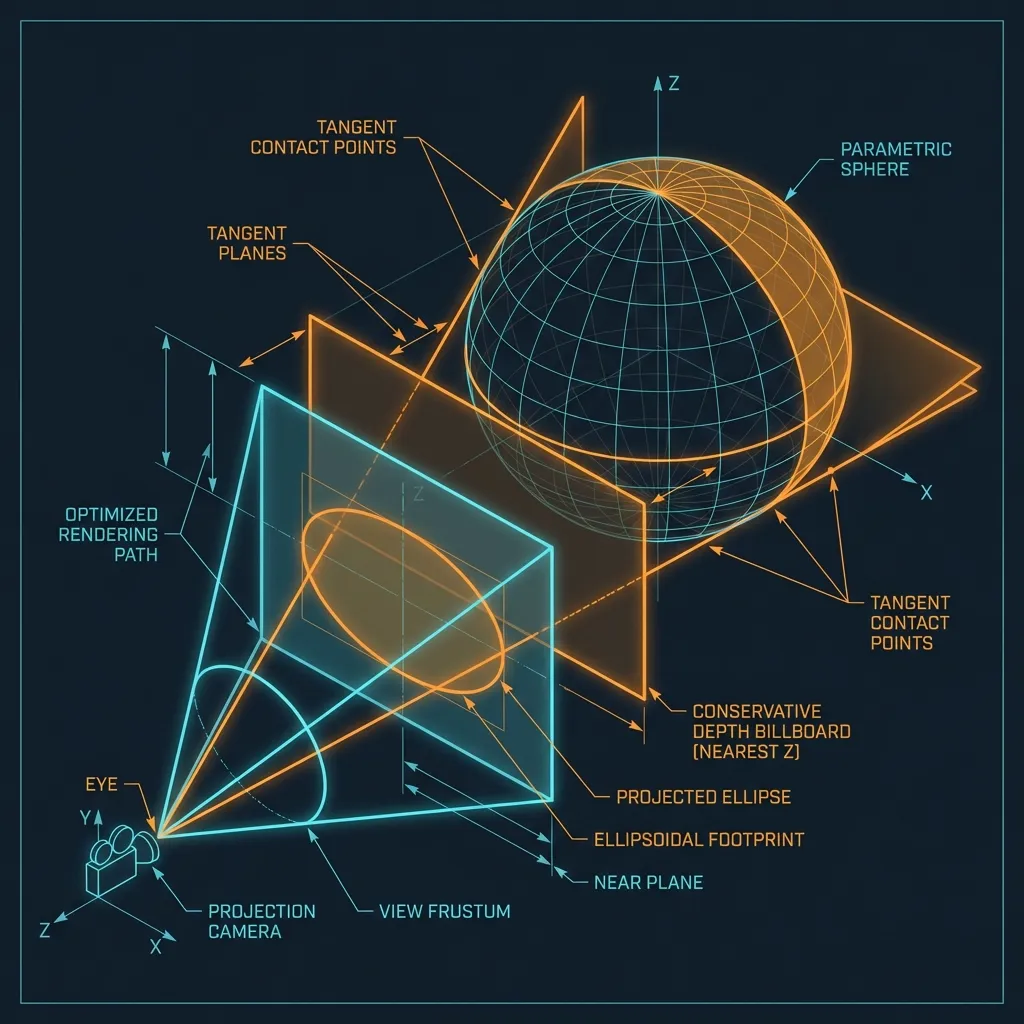
Each sphere is rendered as a single screen-aligned quad (4 vertices, 2 triangles). The fragment shader performs an analytical ray-sphere intersection per pixel, producing mathematically perfect spheres.
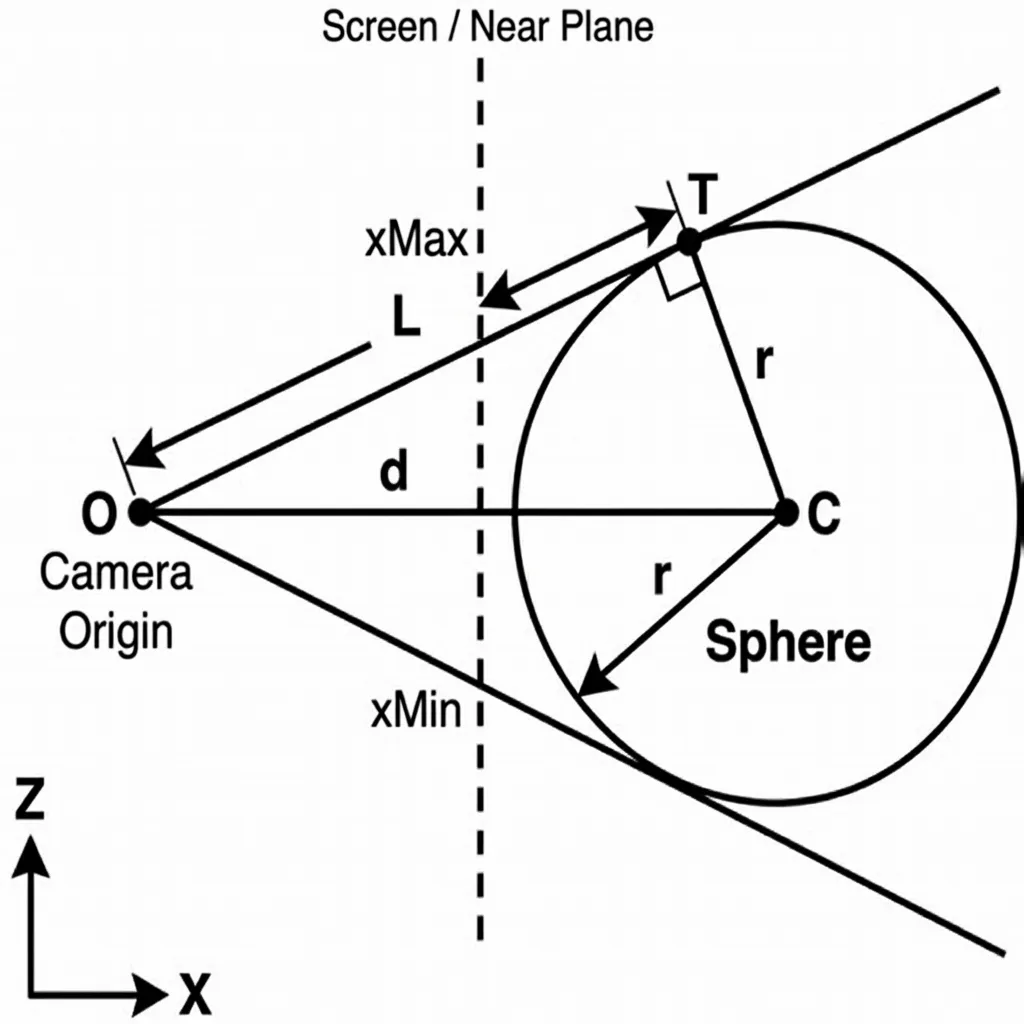
Advantages:
- Pixel-perfect silhouettes (no polygon faceting, ever)
- Correct per-pixel depth (
gl_FragDepthwritten from the ray hit point) - Analytically smooth normals (normalized
hitPos − center) - Edge anti-aliasing via smooth discriminant falloff
- True alpha transparency (glass-like, with back-to-front sorting)
graph LR
    subgraph "Billboard Ray-Tracing (Default)"
        A("4-vertex Quad
(per instance)") -->|"Vertex Shader:
project to sphere bounds"| B("Screen-space quad")
        B -->|"Fragment Shader:
ray-sphere intersection"| C("Perfect sphere
per-pixel normal + depth")
    end

    subgraph "Icosphere Mesh (Fallback)"
        D("642-vertex mesh
(subdivided icosahedron)") -->|"Rasterized as
triangles"| E("Polygon approximation
(faceted at low subdiv)")
    end

    classDef highlight fill:#fff59d,stroke:#f9a825,stroke-width:2px,color:#2d2d2d
    classDef fallback fill:#f5f5f5,stroke:#bdbdbd,stroke-width:1.5px,color:#666666

    class A,B,C highlight
    class D,E fallback
💡 Why Billboard Ray-Tracing? With 100 spheres, the billboard approach uses 100 × 4 = 400 vertices total, versus 100 × 642 = 64,200 vertices for level-3 icospheres. More importantly, the spheres are mathematically perfect at every zoom level — no tessellation artifacts.
Fallback: Instanced Icosphere Mesh (billboard_mode = 0)
The icosphere path generates a recursively subdivided icosahedron:
graph LR
    A("Level 0
12 vertices
20 triangles") -->|"Subdivide"| B("Level 1
42 vertices
80 triangles")
    B -->|"Subdivide"| C("Level 2
162 vertices
320 triangles")
    C -->|"Subdivide"| D("Level 3
642 vertices
1,280 triangles")
    D -->|"..."| E("Level 6
~40k vertices")

    classDef keyFunc fill:#fff59d,stroke:#f9a825,stroke-width:2px,color:#2d2d2d
    classDef subsystem fill:#ffffff,stroke:#aaaaaa,stroke-width:1.5px,color:#444444

    class D keyFunc
    class A,B,C,E subsystem
4.4 — Material Library
scene->material_lib = material_load_presets("assets/materials/pbr_materials.json");
The JSON file defines 101 PBR material presets organized by category:
| Category | Examples | Metallic | Roughness |
|---|---|---|---|
| Pure Metals | Gold, Silver, Copper, Chrome | 1.0 | 0.05–0.2 |
| Weathered Metals | Rusty Iron, Oxidized Copper | 0.7–0.95 | 0.4–0.8 |
| Glossy Dielectrics | Colored Plastics | 0.0 | 0.05–0.15 |
| Matte Materials | Fabric, Clay, Sand | 0.0 | 0.65–0.95 |
| Stones | Granite, Marble, Obsidian | 0.0 | 0.35–0.85 |
| Organics | Oak, Leather, Bone | 0.0 | 0.35–0.75 |
| Paints | Car Paint, Pearl, Satin | 0.3–0.7 | 0.1–0.5 |
| Technical | Rubber, Carbon, Ceramic | 0.0–0.1 | 0.05–0.85 |
Each material provides: albedo (RGB), metallic (0–1), roughness (0–1).
4.5 — The Instance Grid
const int cols    = 10;       // DEFAULT_COLS
const float spacing = 2.5F;   // DEFAULT_SPACING
A 10×10 grid of 100 spheres is laid out in the XY plane, centered at the origin:
Grid dimensions:
  Width  = (10 - 1) × 2.5 = 22.5 units
  Height = (10 - 1) × 2.5 = 22.5 units
  Z = 0 (all spheres in the same plane)
Each instance stores 88 bytes:
typedef struct SphereInstance {
    mat4  model;      // 64 bytes — 4×4 transform matrix
    vec3  albedo;     // 12 bytes — RGB color
    float metallic;   //  4 bytes
    float roughness;  //  4 bytes
    float ao;         //  4 bytes — always 1.0
} SphereInstance;     // Total: 88 bytes per instance
4.6 — VAO Layout (Billboard Mode)
In billboard mode, the VAO binds a 4-vertex quad and per-instance material data:
┌────────────────────────────────────────────────────────────────┐
│              Billboard VAO (Default Rendering Mode)            │
├────────────┬────────────┬─────────────────────────────────────┤
│  Location  │  Source    │  Description                        │
├────────────┼────────────┼─────────────────────────────────────┤
│  0         │  Quad VBO  │  vec3 position   (±0.5 quad verts)  │
│  1         │  Quad VBO  │  vec3 normal     (stub, unused)     │
│  2–5       │  Inst VBO  │  mat4 model      (per-instance)     │
│  6         │  Inst VBO  │  vec3 albedo     (per-instance)     │
│  7         │  Inst VBO  │  vec3 pbr (M,R,AO) (per-instance)   │
└────────────┴────────────┴─────────────────────────────────────┘

Location 0–1: glVertexAttribDivisor = 0 (advance per vertex, 4 verts)
Location 2–7: glVertexAttribDivisor = 1 (advance per instance)
Draw call: glDrawArraysInstanced(GL_TRIANGLE_STRIP, 0, 4, 100) — 100 quads, face culling disabled.
4.7 — Shader Compilation
All shaders are compiled during scene_init(). The loader (src/shader.c) supports a custom @header include system:
// In pbr_ibl_instanced.frag:
@header "pbr_functions.glsl"
@header "sh_probe.glsl"
This recursively inlines files (max depth: 16) with include-guard deduplication.
graph TD
    INIT("scene_init() — Shader Compilation") --> REND
    INIT --> COMP
    INIT --> POST

    subgraph REND ["🎨 Rendering Programs"]
        direction TB
        PBR("PBR Instanced — pbr_ibl_instanced.vert/.frag")
        BB("PBR Billboard — pbr_ibl_billboard.vert/.frag")
        SKY("Skybox — background.vert/.frag")
        UI("UI Overlay — ui.vert/.frag")
    end

    subgraph COMP ["⚡ Compute Shaders"]
        direction TB
        SPMAP("Specular Prefilter — IBL/spmap.glsl")
        IRMAP("Irradiance Conv. — IBL/irmap.glsl")
        BRDF("BRDF LUT — IBL/spbrdf.glsl")
        LUM("Luminance Reduction — IBL/luminance_reduce")
    end

    subgraph POST ["✨ Post-Process"]
        direction TB
        PP("Final Composite — postprocess.vert/.frag")
        BL("Bloom — down/up/prefilter")
    end

    classDef keyFunc fill:#fff59d,stroke:#f9a825,stroke-width:2px,color:#2d2d2d
    classDef render fill:#e3f2fd,stroke:#42a5f5,stroke-width:1.5px,color:#2d2d2d
    classDef compute fill:#f3e5f5,stroke:#ab47bc,stroke-width:1.5px,color:#2d2d2d
    classDef postfx fill:#fce4ec,stroke:#c2185b,stroke-width:1.5px,color:#2d2d2d

    class INIT keyFunc
    class PBR,BB,SKY,UI render
    class SPMAP,IRMAP,BRDF,LUM compute
    class PP,BL postfx
Chapter 5 — Post-Processing Pipeline Setup
postprocess_init(&app->postprocess, &app->gpu_profiler, 1920, 1080);
5.1 — The Scene FBO (Multi-Render Target)
The main offscreen framebuffer uses MRT (Multiple Render Targets):
| Attachment | Format | Size | Purpose |
|---|---|---|---|
GL_COLOR_ATTACHMENT0 |
GL_RGBA16F |
1920×1080 | HDR scene color (alpha = luma for FXAA) |
GL_COLOR_ATTACHMENT1 |
GL_RG16F |
1920×1080 | Per-pixel velocity for motion blur |
GL_DEPTH_STENCIL_ATTACHMENT |
GL_DEPTH32F_STENCIL8 |
1920×1080 | Depth buffer + stencil mask |
| Stencil view | GL_R8UI |
1920×1080 | Read-only stencil as texture |
graph TD
    FBO("Scene FBO — Multi-Render Target") --> C0
    FBO --> C1
    FBO --> DS
    DS --> SV

    C0("🟦 Color 0 — GL_RGBA16F
HDR Scene Color")
    C1("🟩 Color 1 — GL_RG16F
Velocity Vectors")
    DS("🟫 Depth/Stencil — GL_DEPTH32F_STENCIL8")
    SV("🟪 Stencil View — GL_R8UI (TextureView)")

    classDef keyFunc fill:#fff59d,stroke:#f9a825,stroke-width:2px,color:#2d2d2d
    classDef color0 fill:#e3f2fd,stroke:#42a5f5,stroke-width:1.5px,color:#2d2d2d
    classDef color1 fill:#e8f5e9,stroke:#66bb6a,stroke-width:1.5px,color:#2d2d2d
    classDef depth fill:#fff3e0,stroke:#ff9800,stroke-width:1.5px,color:#2d2d2d
    classDef stencil fill:#f3e5f5,stroke:#ab47bc,stroke-width:1.5px,color:#2d2d2d

    class FBO keyFunc
    class C0 color0
    class C1 color1
    class DS depth
    class SV stencil
5.2 — Sub-Effect Resources
Each post-processing effect initializes its own resources:
| Effect | GPU Resources |
|---|---|
| Bloom | Mip-chain FBOs (6 levels), prefilter/downsample/upsample textures |
| DoF | Blur texture, CoC (Circle of Confusion) texture |
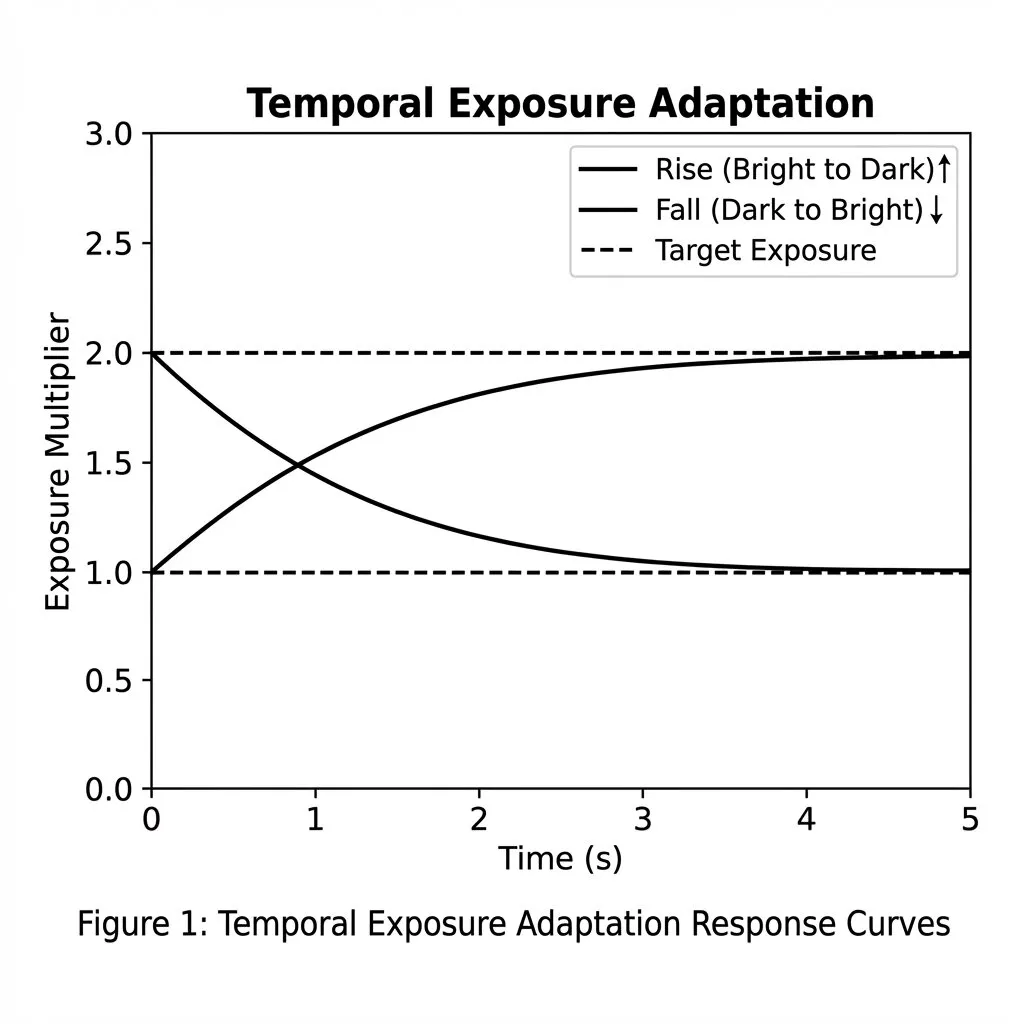
| Auto-Exposure | Luminance downsample texture, 2× PBOs (readback), 2× GLSync fences |
| Motion Blur | Tile-max velocity texture (compute), neighbor-max texture (compute) |
| 3D LUT | 32³ GL_TEXTURE_3D loaded from .cube files |
5.3 — Default Active Effects
postprocess_enable(&app->postprocess, POSTFX_FXAA); // Only FXAA
On startup, only FXAA is active. Other effects are toggled at runtime via keyboard shortcuts.
Chapter 6 — The First HDR Environment Load
env_manager_load(&app->env_mgr, app->async_loader, "env.hdr");
This triggers the asynchronous environment loading pipeline — the most complex multi-frame operation in the engine.
6.1 — Async Loading Sequence
sequenceDiagram
    participant Main as Main Thread (Render)
    participant Worker as Async Worker Thread
    participant GPU as GPU

    Main->>Worker: async_loader_request("env.hdr")
    Note over Worker: State: PENDING → LOADING
    Worker->>Worker: stbi_loadf() — decode HDR to float RGBA
    Note over Worker: ~50ms for 2K HDR on NVMe

    Worker-->>Main: State: WAITING_FOR_PBO
    Main->>GPU: glGenBuffers() → PBO
    Main->>GPU: glMapBuffer(PBO, WRITE)
    Main-->>Worker: async_loader_provide_pbo(pbo_ptr)

    Note over Worker: State: CONVERTING
    Worker->>Worker: SIMD float32 → float16 conversion
    Note over Worker: ~2ms for 2048×1024

    Worker-->>Main: State: READY
    Main->>GPU: glUnmapBuffer(PBO)
    Main->>GPU: glTexSubImage2D(from PBO)
    Note over GPU: DMA transfer: PBO → VRAM
    Main->>GPU: glGenerateMipmap()
6.2 — Transition State Machine
During the first load, the screen stays black (no crossfade from a previous scene):
stateDiagram-v2
    [*] --> WAIT_IBL: "First load"
    WAIT_IBL --> WAIT_IBL: "IBL in progress..."
    WAIT_IBL --> FADE_IN: "IBL complete"
    FADE_IN --> IDLE: "Alpha reaches 0"
WAIT_IBL: transition_alpha = 1.0 (fully opaque black) — the screen is black during the first few frames.
FADE_IN: Alpha decreases from 1.0 → 0.0 over 250ms.
Chapter 7 — IBL Generation (Progressive, Multi-Frame)
Once the HDR texture is uploaded, the IBL Coordinator (src/ibl_coordinator.c) takes over. It computes three maps across multiple frames to avoid GPU stalls.
7.1 — The Three IBL Maps
graph TB
    HDR("HDR Environment Map
2048×1024 equirectangular
GL_RGBA16F") --> SPEC
    HDR --> IRR
    HDR --> LUM

    SPEC("Specular Prefilter Map
1024×1024 × 5 mip levels
Compute: spmap.glsl")
    IRR("Irradiance Map
64×64
Compute: irmap.glsl")
    LUM("Luminance Reduction
1×1 average
Compute: luminance_reduce")

    SPEC -->|"Per-pixel reflection
roughness → mip level"| PBR("PBR Shader")
    IRR -->|"Diffuse hemisphere
integral"| PBR
    LUM -->|"Auto exposure
threshold"| PP("Post-Process")

    classDef keyFunc fill:#fff59d,stroke:#f9a825,stroke-width:2px,color:#2d2d2d
    classDef compute fill:#f3e5f5,stroke:#ab47bc,stroke-width:1.5px,color:#2d2d2d
    classDef target fill:#e3f2fd,stroke:#42a5f5,stroke-width:1.5px,color:#2d2d2d

    class HDR keyFunc
    class SPEC,IRR,LUM compute
    class PBR,PP target
| Map | Resolution | Format | Mip Levels | Compute Shader |
|---|---|---|---|---|
| Specular Prefilter | 1024×1024 | GL_RGBA16F |
5 | IBL/spmap.glsl |
| Irradiance | 64×64 | GL_RGBA16F |
1 | IBL/irmap.glsl |
| Luminance | 1×1 | GL_R32F |
1 | IBL/luminance_reduce_pass1/2.glsl |
7.2 — Progressive Slicing Strategy
To avoid frame spikes, each mip level is subdivided into slices processed over consecutive frames:
| IBL Stage | Hardware GPU | Software GPU (llvmpipe) |
|---|---|---|
| Specular Mip 0 (1024²) | 24 slices (42 rows each) | 1 slice (full) |
| Specular Mip 1 (512²) | 8 slices | 1 slice |
| Specular Mips 2–4 | Grouped (1 dispatch) | 1 slice |
| Irradiance (64²) | 12 slices | 1 slice |
| Luminance | 2 dispatches (pass 1 + 2) | 2 dispatches |
gantt
    title Progressive IBL Generation Timeline
    dateFormat x
    axisFormat Frame %s

    section Luminance
    Luminance Pass 1       :lum1, 0, 1000
    Luminance Wait (fence) :lum2, 1000, 2000
    Luminance Readback     :lum3, 2000, 3000

    section Specular Mip 0
    Slice 1/24             :s1, 3000, 4000
    Slice 2/24             :s2, 4000, 5000
    Slice ...              :s3, 5000, 6000
    Slice 24/24            :s4, 6000, 7000

    section Specular Mip 1
    Slices 1-8             :m1, 7000, 9000

    section Specular Mips 2-4
    Grouped dispatch       :m3, 9000, 10000

    section Irradiance
    Slices 1-12            :i1, 10000, 12000

    section Done
    IBL Complete → Fade In :ibl_done, 12000, 13000
7.3 — IBL State Machine
enum IBLState {
    IBL_STATE_IDLE,             // No work
    IBL_STATE_LUMINANCE,        // Pass 1: luminance reduction
    IBL_STATE_LUMINANCE_WAIT,   // Wait for readback fence
    IBL_STATE_SPECULAR_INIT,    // Allocate specular texture
    IBL_STATE_SPECULAR_MIPS,    // Progressive mip generation
    IBL_STATE_IRRADIANCE,       // Progressive irradiance convolution
    IBL_STATE_DONE              // All maps ready
};
Chapter 8 — The Main Loop
app_run() (src/app.c) is the heartbeat — a classic uncapped game loop with fixed-timestep physics.
graph TD
    A("① glfwPollEvents() — Keyboard, mouse, resize")
    A --> B("② Time & FPS — delta_time, frame_count")
    B --> C("③ Camera Physics — Fixed 60Hz, smooth rotation lerp")
    C --> D("④ Geometry Update — if subdivisions changed")
    D --> E("⑤ app_update() — Process input state")
    E --> F("⑥ renderer_draw_frame() — THE BIG ONE")
    F --> G("⑦ Tracy screenshots — profiling")
    G --> H("⑧ glfwSwapBuffers() — Present to screen")
    H -->|"next frame"| A

    classDef keyFunc fill:#fff59d,stroke:#f9a825,stroke-width:2px,color:#2d2d2d
    classDef loopNode fill:#e3f2fd,stroke:#42a5f5,stroke-width:1.5px,color:#2d2d2d
    classDef subsystem fill:#ffffff,stroke:#aaaaaa,stroke-width:1.5px,color:#444444

    class F keyFunc
    class A,B,C,D,E,G loopNode
    class H subsystem
8.1 — Deferred Resize
Window resize events are deferred — the GLFW callback only records the new dimensions. The actual FBO recreation happens at the start of the next frame, outside the callback's limited context.
8.2 — Camera Fixed-Timestep Integration
app->camera.physics_accumulator += (float)app->delta_time;
while (app->camera.physics_accumulator >= app->camera.fixed_timestep) {
    camera_fixed_update(&app->camera);  // Velocity, friction, bobbing
    app->camera.physics_accumulator -= app->camera.fixed_timestep;
}

// Smooth rotation (exponential interpolation)
float alpha = app->camera.rotation_smoothing;  // ~0.1
app->camera.yaw   += (app->camera.yaw_target   - app->camera.yaw)   * alpha;
app->camera.pitch += (app->camera.pitch_target - app->camera.pitch) * alpha;
camera_update_vectors(&app->camera);
This ensures deterministic physics regardless of frame rate, while rotation stays smooth via per-frame interpolation.
Chapter 9 — Rendering a Frame
renderer_draw_frame() (src/renderer.c) orchestrates the full rendering pipeline.
9.1 — High-Level Architecture
graph TD
    A("GPU Profiler Begin") --> B("postprocess_begin() — Bind Scene FBO, Clear")
    B --> C("camera_get_view_matrix()")
    C --> D("glm_perspective() — FOV=60°, near=0.1, far=1000")
    D --> E("ViewProj = Proj × View")
    E --> G1("🌅 Pass 1: Skybox — depth disabled")
    G1 --> G2("🔢 Pass 2: Sphere Sorting — GPU Bitonic")
    G2 --> G3("🔮 Pass 3: PBR Spheres — instanced billboard draw")
    G3 --> H("✨ postprocess_end() — 7-Stage Pipeline")
    H --> I("🖥️ UI Overlay + Env Transition")

    classDef keyFunc fill:#fff59d,stroke:#f9a825,stroke-width:2px,color:#2d2d2d
    classDef loopNode fill:#e3f2fd,stroke:#42a5f5,stroke-width:1.5px,color:#2d2d2d
    classDef setup fill:#ffffff,stroke:#aaaaaa,stroke-width:1.5px,color:#444444
    classDef postfx fill:#fce4ec,stroke:#c2185b,stroke-width:1.5px,color:#2d2d2d

    class G1,G2,G3 keyFunc
    class A,B,C,D,E setup
    class H,I postfx
9.2 — Pass 1: Skybox
The skybox is drawn first, with depth testing disabled. It uses a fullscreen quad trick:
// background.vert — reconstruct world-space ray
gl_Position = vec4(in_position.xy, 1.0, 1.0);  // Depth = 1.0 (far plane)
vec4 pos = m_inv_view_proj * vec4(in_position.xy, 1.0, 1.0);
RayDir = pos.xyz / pos.w;  // Reconstructed world-space ray
// background.frag — equirectangular sampling of the HDR
vec2 uv = SampleEquirectangular(normalize(RayDir));
vec3 envColor = textureLod(environmentMap, uv, blur_lod).rgb;
envColor = clamp(envColor, vec3(0.0), vec3(200.0));  // NaN protection + anti-fireflies
FragColor = vec4(envColor, luma);  // Alpha = luma for FXAA
VelocityOut = vec2(0.0);          // No motion for skybox
9.3 — Pass 2: Sphere Sorting (GPU Bitonic Sort)
For transparent billboard rendering, spheres must be drawn back-to-front:
| Mode | Where | Algorithm | Complexity |
|---|---|---|---|
CPU_QSORT |
CPU | qsort() (stdlib) |
O(n·log n) avg |
CPU_RADIX |
CPU | Radix sort | O(n·k) |
GPU_BITONIC ★ |
GPU | Bitonic merge sort (compute) | O(n·log²n) |
9.4 — Pass 3: PBR Spheres — Billboard Ray-Tracing
This is the core rendering pass. A single draw call renders all 100 spheres:
| Metric | Value |
|---|---|
| Vertices per sphere | 4 (billboard quad) |
| Triangles per sphere | 2 (triangle strip) |
| Instances | 100 (10×10 grid) |
| Total vertices | 400 |
| Draw calls | 1 |
| Sphere precision | Mathematically perfect (ray-traced) |
9.5 — The Billboard Fragment Shader (Ray-Sphere Intersection)
The fragment shader (pbr_ibl_billboard.frag) is where the real magic happens. Instead of shading a rasterized mesh, it analytically intersects a ray with a perfect sphere:
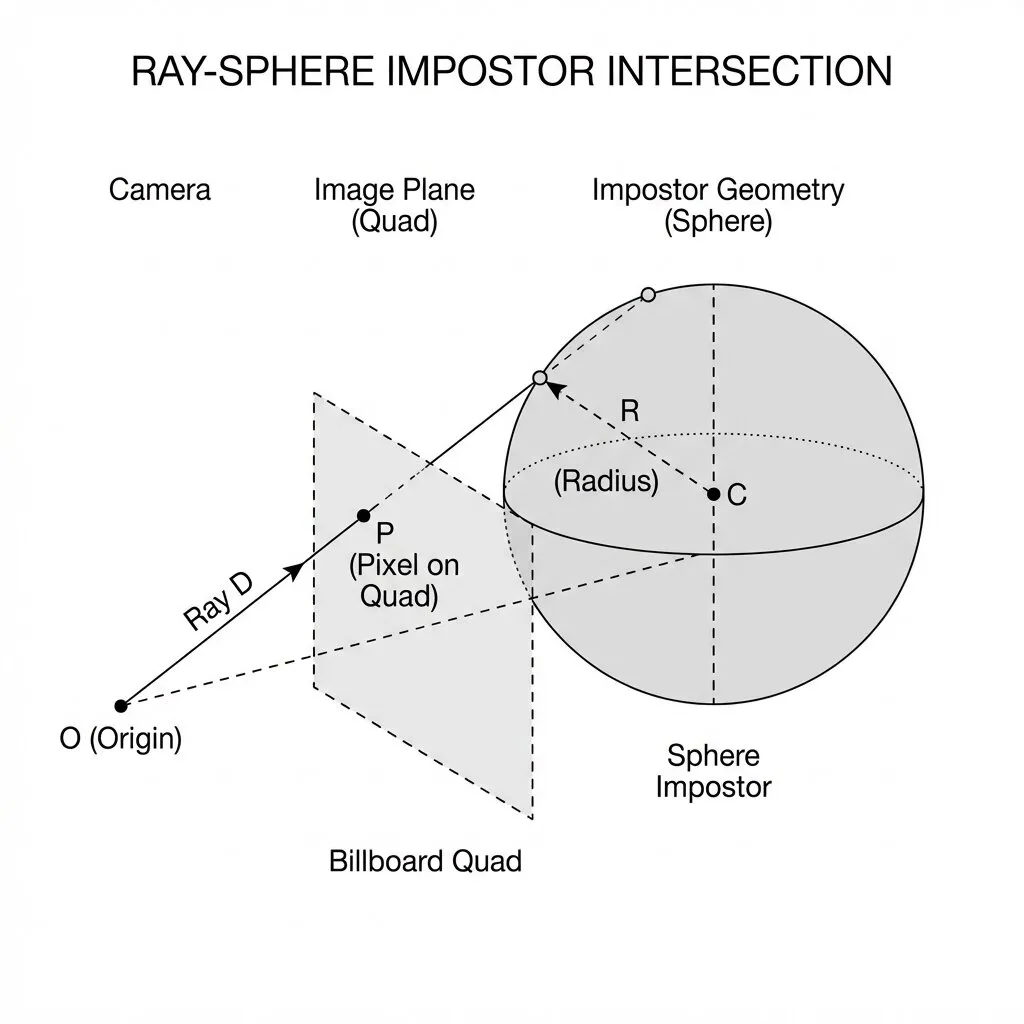
// Analytical ray-sphere intersection
vec3 oc = rayOrigin - center;
float b = dot(oc, rayDir);
float c = dot(oc, oc) - radius * radius;
float discriminant = b * b - c;  // >0 = hit, <0 = miss
if (discriminant < 0.0) discard;
float t = -b - sqrt(discriminant);  // nearest intersection
vec3 hitPos = rayOrigin + t * rayDir;
vec3 N = normalize(hitPos - center);  // perfect analytic normal
graph TD
    R("🔦 Build Ray — origin=camPos, dir=normalize(WorldPos-camPos)")
    R --> INT("📐 Ray-Sphere Intersection — discriminant = b² - c")
    INT --> HIT{"Hit?"}
    HIT -->|"No — disc < 0"| DISCARD("❌ discard — pixel outside sphere")
    HIT -->|"Yes"| HITPOS("✅ hitPos = origin + t × dir")
    HITPOS --> NORMAL("N = normalize(hitPos - center) — perfect normal")
    HITPOS --> DEPTH("gl_FragDepth = project(hitPos) — correct Z-buffer")
    NORMAL --> PBR("V = -rayDir")
    PBR --> FRESNEL("Fresnel-Schlick")
    PBR --> GGX("Smith-GGX Geometry")
    PBR --> NDF("GGX NDF Distribution")
    FRESNEL & GGX & NDF --> SPEC("IBL Specular — prefilterMap × brdfLUT")
    PBR --> DIFF("IBL Diffuse — irradiance(N) × albedo")
    SPEC & DIFF --> FINAL("color = Diffuse + Specular")
    FINAL --> AA("Edge Anti-Aliasing — smoothstep on discriminant")
    AA --> ALPHA("FragColor = vec4(color, edgeFactor) — premultiplied alpha")

    classDef keyFunc fill:#fff59d,stroke:#f9a825,stroke-width:2px,color:#2d2d2d
    classDef compute fill:#e3f2fd,stroke:#42a5f5,stroke-width:1.5px,color:#2d2d2d
    classDef entryExit fill:#fce4ec,stroke:#c2185b,stroke-width:2px,color:#2d2d2d
    classDef subsystem fill:#ffffff,stroke:#aaaaaa,stroke-width:1.5px,color:#444444

    class R,INT,HIT keyFunc
    class HITPOS,NORMAL,DEPTH,PBR compute
    class FRESNEL,GGX,NDF,SPEC,DIFF subsystem
    class FINAL,AA,ALPHA,DISCARD entryExit
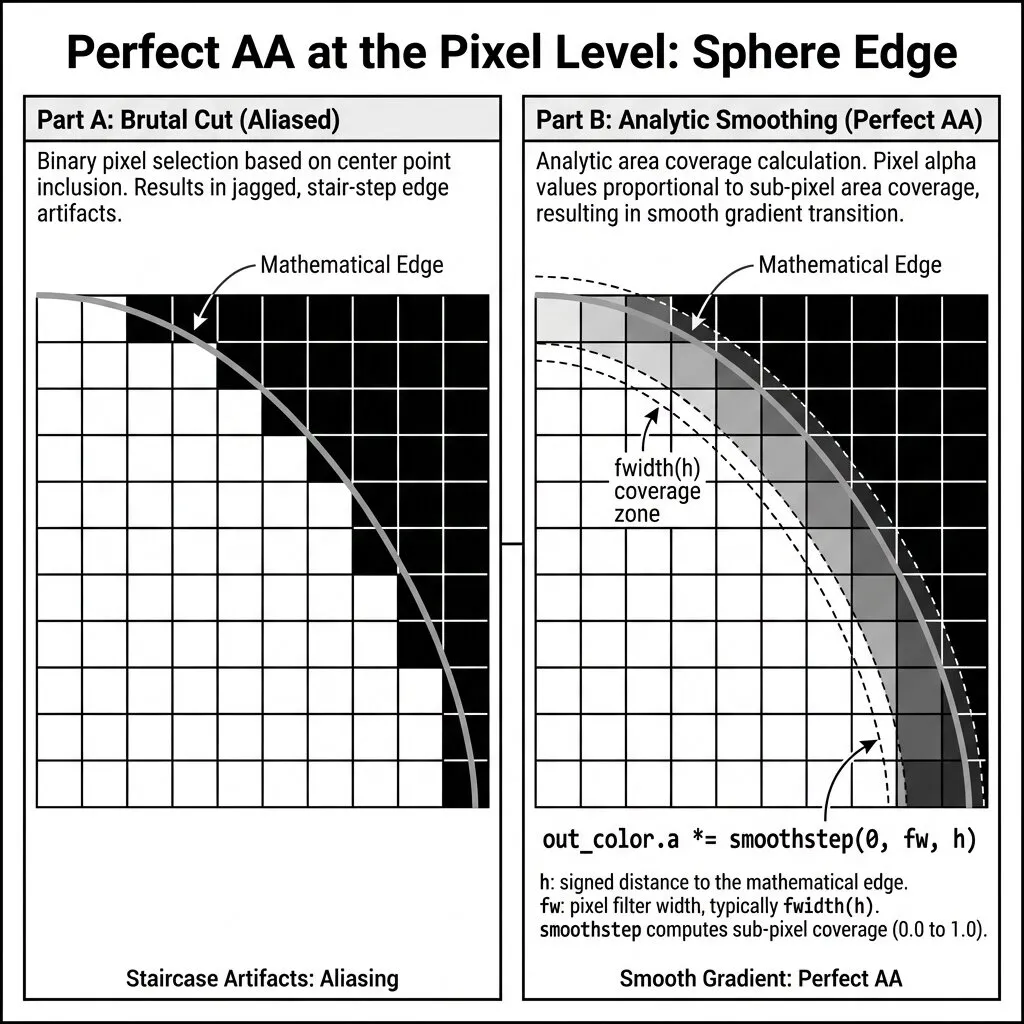
Analytical Edge Anti-Aliasing
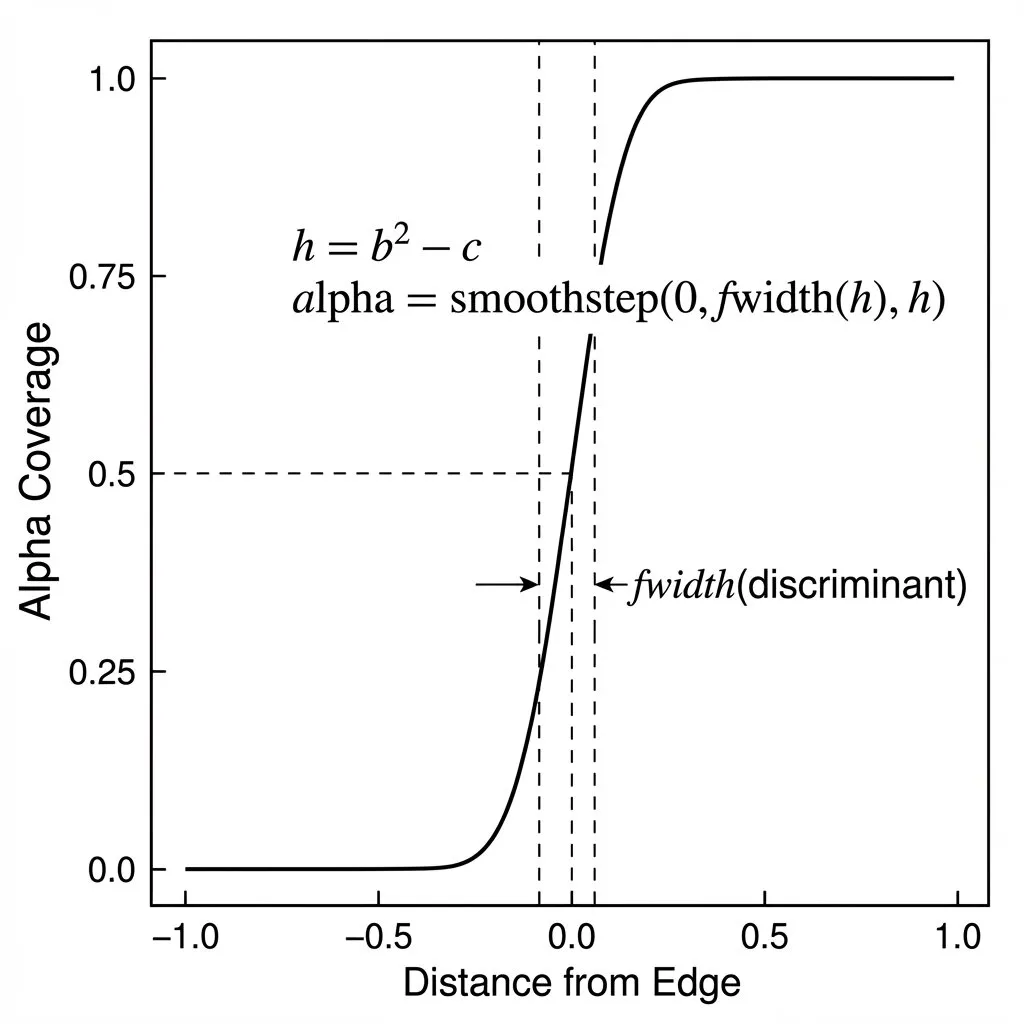
float pixelSizeWorld = (2.0 * clipW) / (proj[1][1] * screenHeight);
float edgeFactor = smoothstep(0.0, 1.0, discriminant / (2.0 * radius * pixelSizeWorld));
FragColor = vec4(color * edgeFactor, edgeFactor);  // premultiplied alpha
Billboard Projection
Chapter 10 — Post-Processing Pipeline
After the 3D scene is rendered into the MRT FBO, postprocess_end() applies up to 8 effects in a carefully ordered pipeline.
10.1 — The 7-Stage Pipeline
graph TD
    A("Memory Barrier — flush MRT writes")
    A --> B("① Bloom — Downsample → Threshold → Upsample")
    B --> C("② Depth of Field — CoC → Bokeh blur")
    C --> D("③ Auto-Exposure — Luminance reduction → PBO readback")
    D --> E("④ Motion Blur — Tile-max velocity → Neighbor-max")
    E --> F("⑤ Bind 9 Textures + Upload UBO")
    F --> H("Draw fullscreen quad")
    H --> J("Vignette")
    J --> K("Film Grain")
    K --> L("White Balance")
    L --> M("Color Grading — Sat, Contrast, Gamma, Gain")
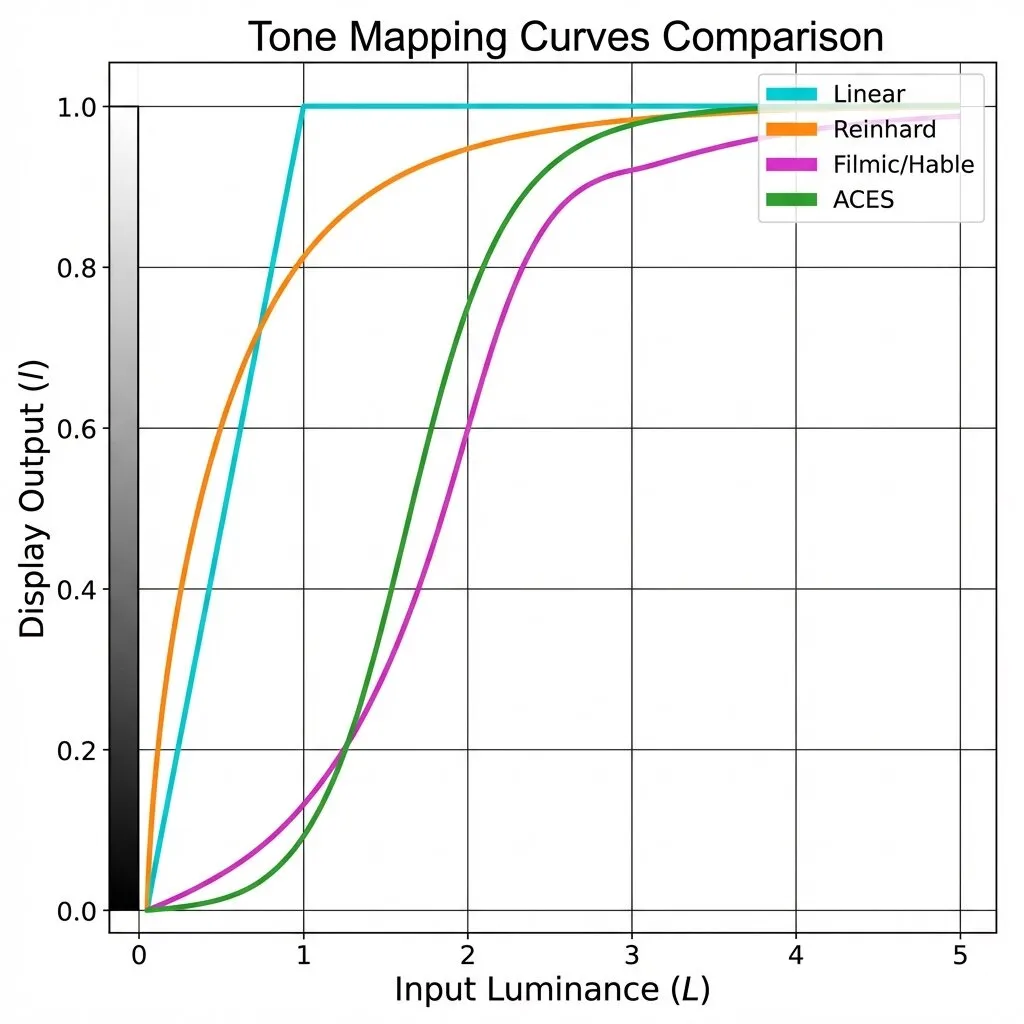
    M --> N("Tonemapping — filmic curve")
    N --> O("3D LUT Grading")
    O --> P("FXAA")
    P --> Q("Dithering — anti-banding")
    Q --> R("Atmospheric Fog")

    classDef keyFunc fill:#fff59d,stroke:#f9a825,stroke-width:2px,color:#2d2d2d
    classDef compute fill:#f3e5f5,stroke:#ab47bc,stroke-width:1.5px,color:#2d2d2d
    classDef shader fill:#e3f2fd,stroke:#42a5f5,stroke-width:1.5px,color:#2d2d2d
    classDef subsystem fill:#ffffff,stroke:#aaaaaa,stroke-width:1.5px,color:#444444

    class A,F,H subsystem
    class B,C,D,E compute
    class J,K,L,M,N,O,P,Q,R shader
10.2 — Post-Processing Effects Gallery
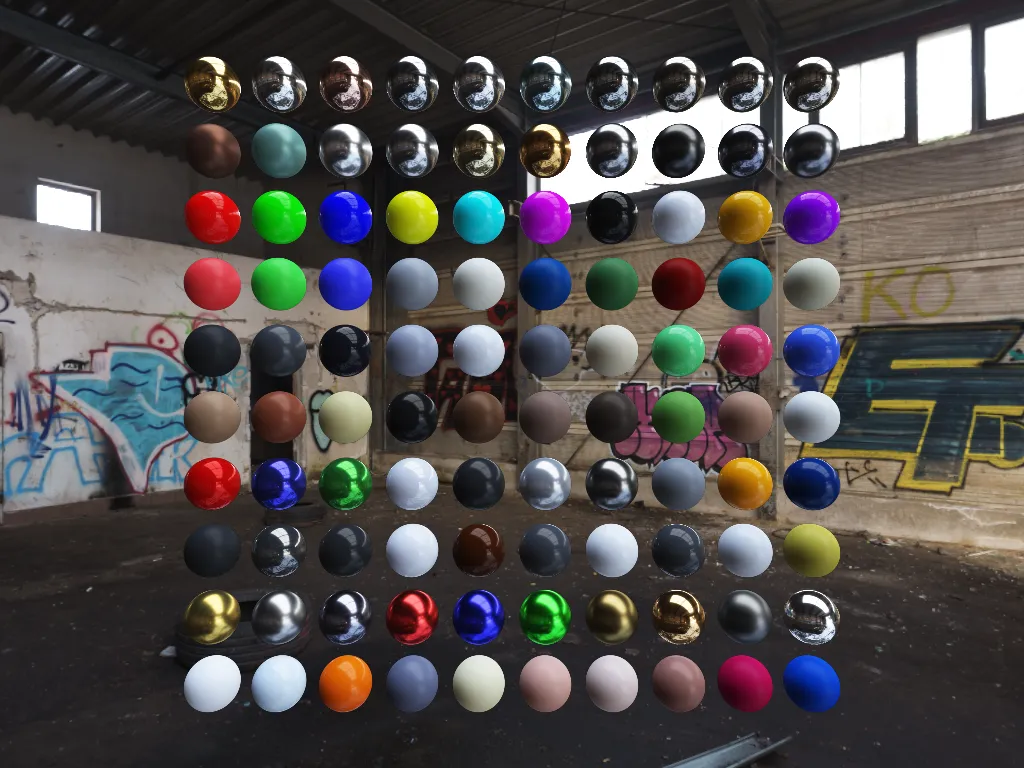
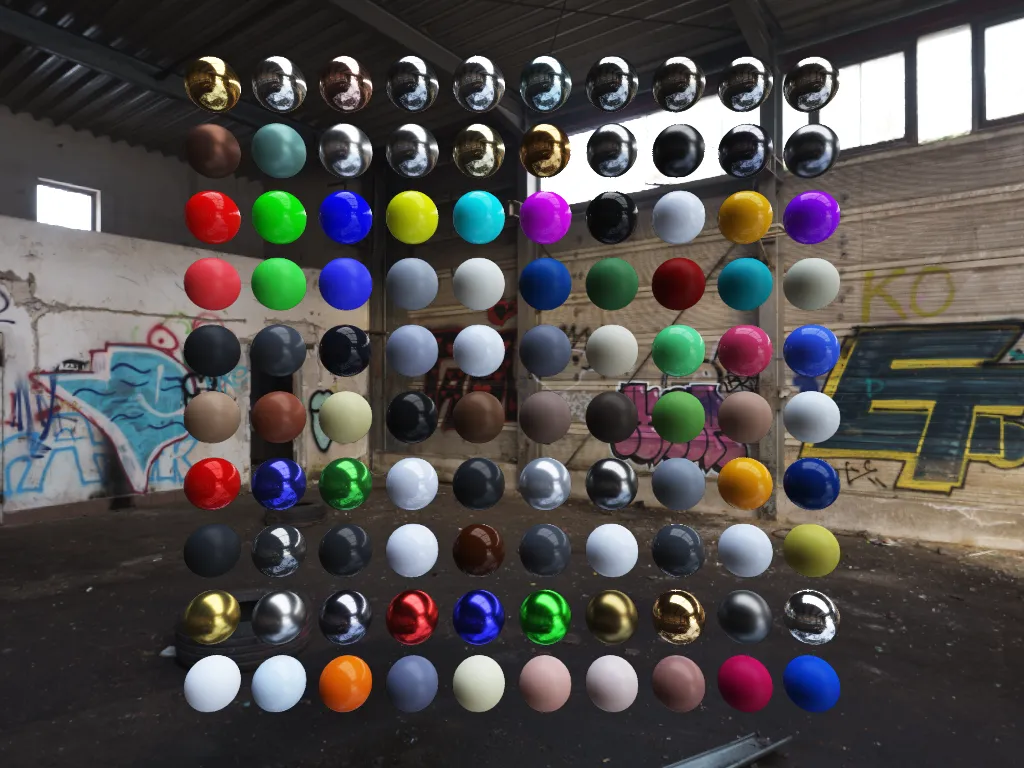
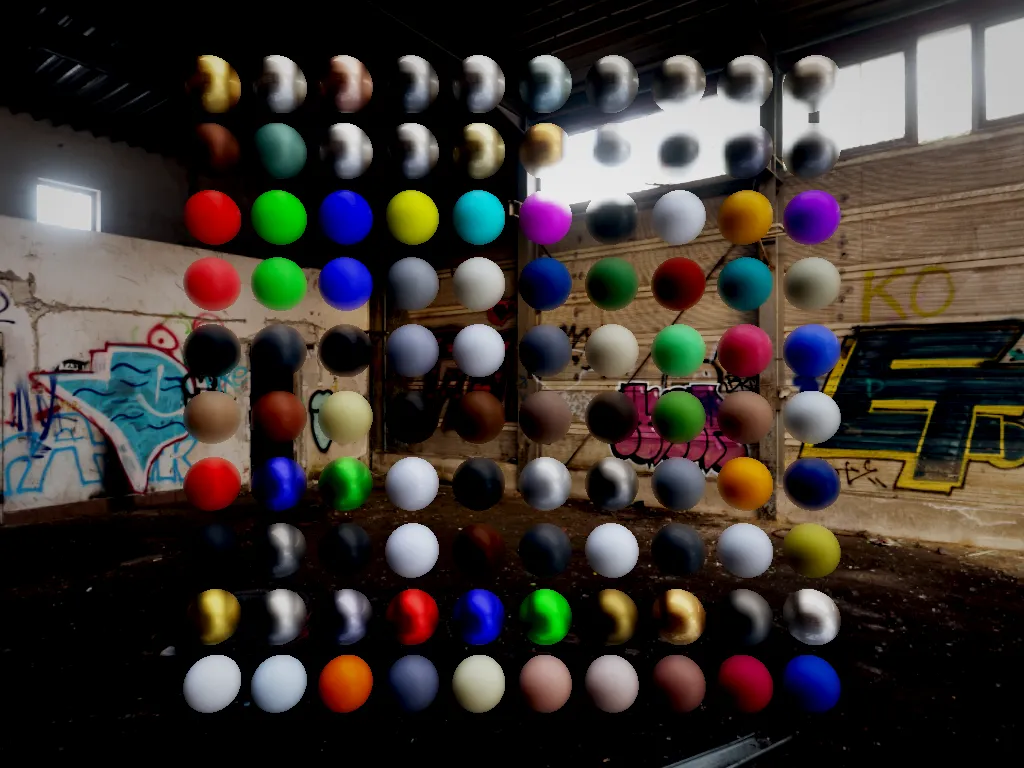
Here is the front view render with different effects enabled individually — each image shows a single effect applied to the same scene:
No post-processing (raw)
FXAA (fast anti-aliasing)
Bloom
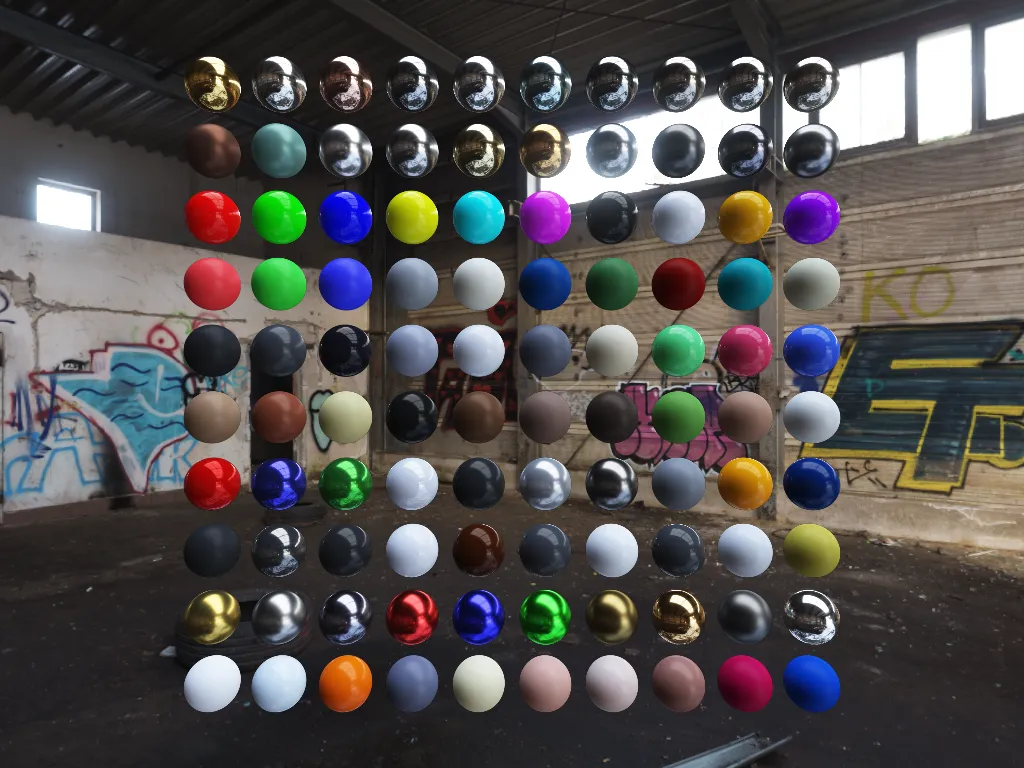
Depth of Field
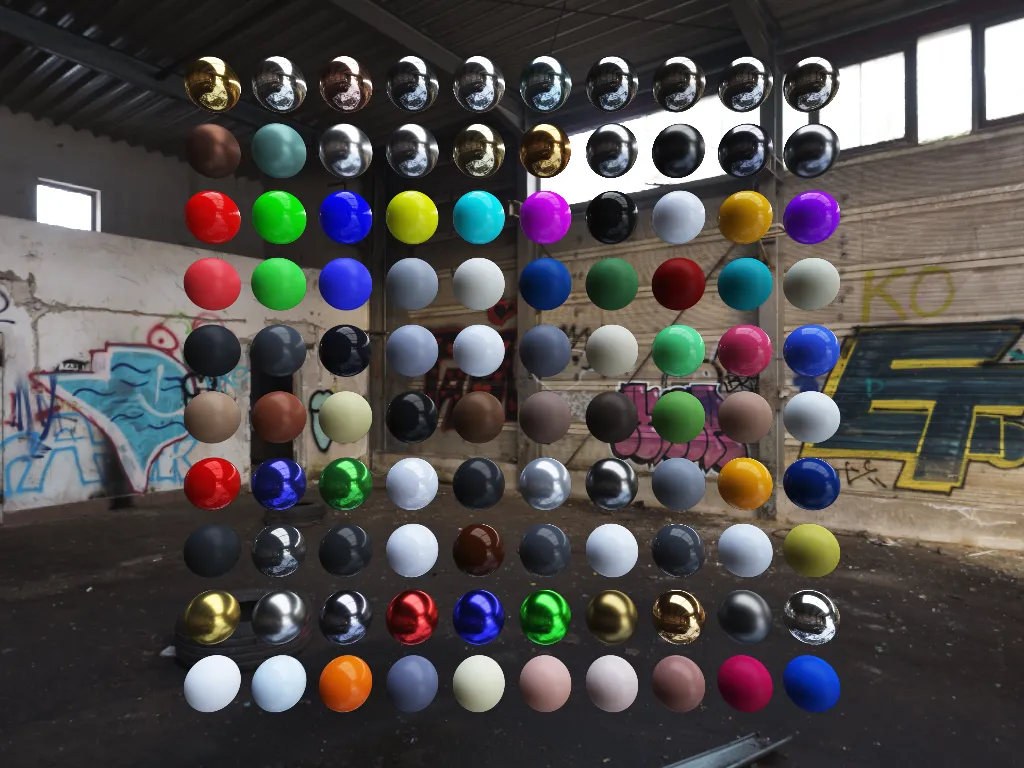
Auto-Exposure
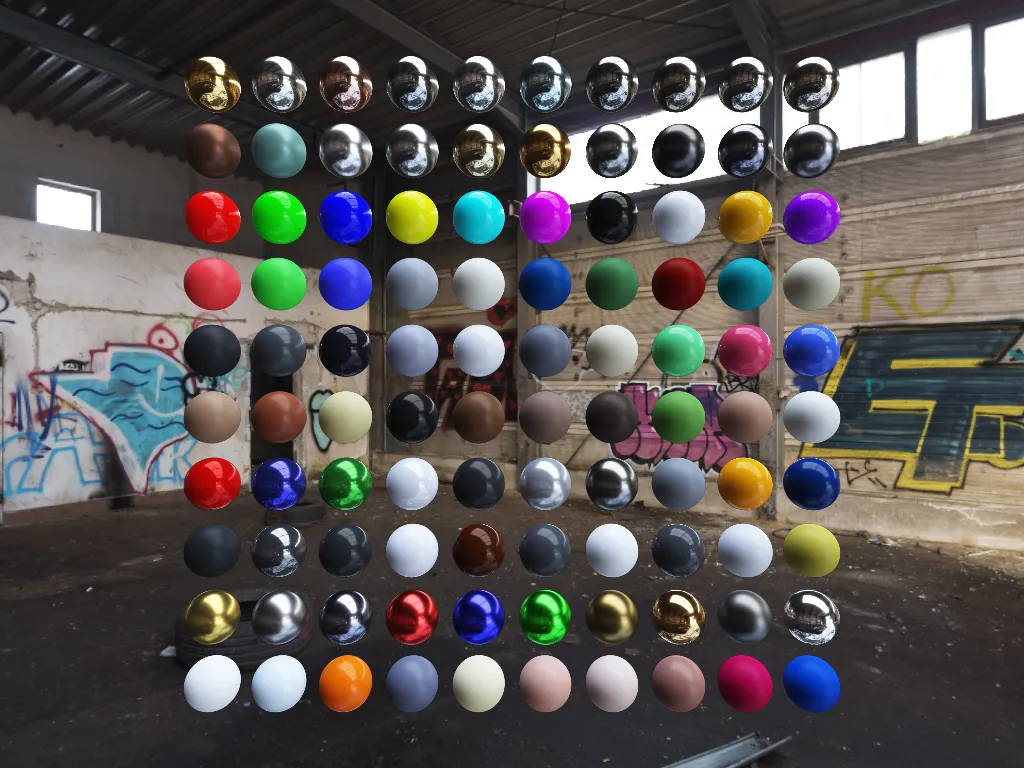
Motion Blur
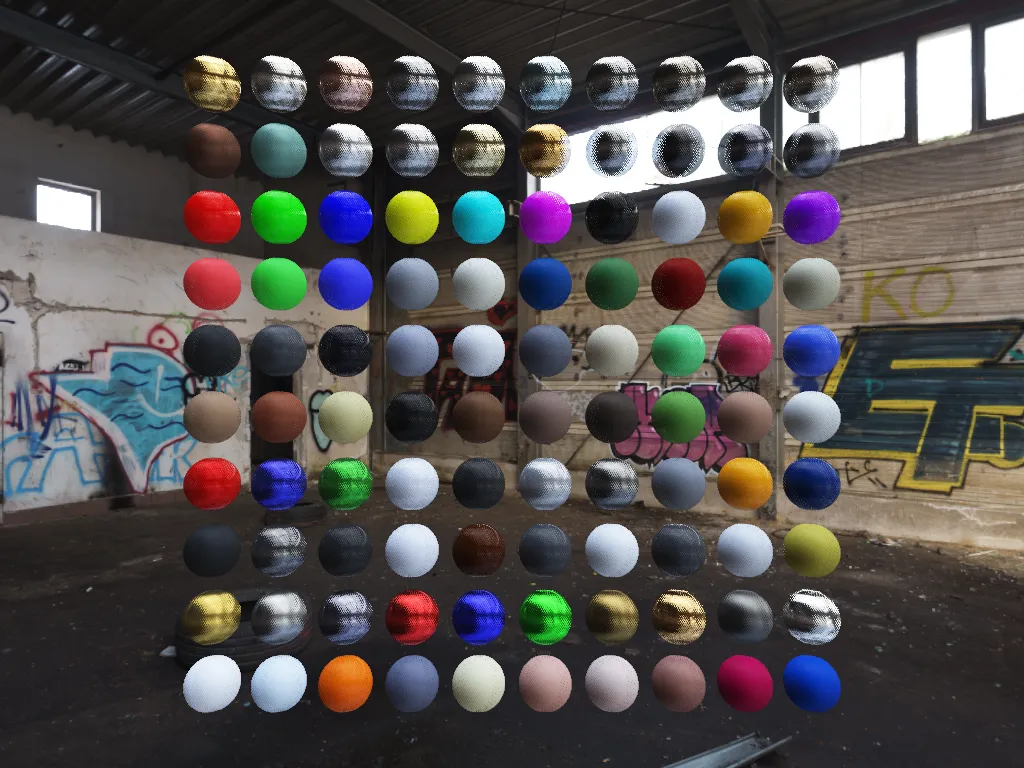
Sony A7S III Cinematic Profile
10.3 — Shader Optimization via Conditional Compilation
The post-process fragment shader uses compile-time #defines to eliminate branches:
#ifdef OPT_ENABLE_BLOOM
    color += bloomTexture * bloomIntensity;
#endif

#ifdef OPT_ENABLE_FXAA
    color = fxaa(color, uv, texelSize);
#endif
A 32-entry LRU cache stores compiled shader variants for different effect flag combinations. Switching effects triggers lazy recompilation only for new combinations.
10.4 — Tonemapping Curves
10.5 — Exposure Adaptation
Chapter 11 — The First Visible Frame
Let's trace what actually appears on screen during the first seconds:
Startup Timeline
| Frames | What Happens | On Screen |
|---|---|---|
| 1–2 | Async loader reads env.hdr from disk |
Black screen (transition_alpha = 1.0) |
| 3–4 | PBO → GPU texture transfer (DMA) + mipmap generation | Black screen |
| 5–15 | Progressive IBL computation (luminance, specular, irradiance) | Black screen (but spheres are rendered into FBO) |
| ~16 | IBL complete → TRANSITION_FADE_IN |
Fade-in begins |
| ~20+ | Transition complete — steady state | Fully-lit PBR scene |
Steady-State Frame
| Step | Detail | Time |
|---|---|---|
| 1. Poll Events | glfwPollEvents() |
~0.1ms CPU |
| 2. Camera Update | 60Hz physics + rotation lerp | ~0.01ms CPU |
| 3a. Skybox | Fullscreen quad, equirect. sampling | ~0.2ms GPU |
| 3b. Bitonic Sort | Compute shader, 100 spheres | ~0.1ms GPU |
| 3c. Billboard Spheres | 100 ray-traced quads, 1 draw call | ~0.5ms GPU |
| 4a. Bloom | Downsample → Upsample (if enabled) | ~0.3ms GPU |
| 4b. DoF | CoC → Bokeh blur (if enabled) | ~0.2ms GPU |
| 4c. Auto-Exposure | Luminance reduction | ~0.1ms GPU |
| 4d. Motion Blur | Tile-max velocity (if enabled) | ~0.2ms GPU |
| 4e. Final Composite | 9 textures, UBO, fullscreen quad | ~0.3ms GPU |
| 5. UI Overlay | Text + profiler + transition | ~0.1ms GPU |
| 6. SwapBuffers | Present to screen | (wait) |
| Typical frame time | 1–3ms GPU |
Chapter 12 — GPU Memory Budget
Here's an estimate of VRAM consumption at steady state:
Textures
| Resource | Resolution | Format | Size |
|---|---|---|---|
| HDR Environment | 2048×1024 | GL_RGBA16F |
~16 MB (with mips) |
| Specular Prefilter | 1024² × 5 mips | GL_RGBA16F |
~10.5 MB |
| Irradiance | 64×64 | GL_RGBA16F |
~32 KB |
| BRDF LUT | 512×512 | GL_RG16F |
~1 MB |
| Scene Color (FBO) | 1920×1080 | GL_RGBA16F |
~16 MB |
| Velocity (FBO) | 1920×1080 | GL_RG16F |
~8 MB |
| Depth/Stencil (FBO) | 1920×1080 | GL_DEPTH32F_STENCIL8 |
~10 MB |
| Bloom chain (6 mips) | Various | GL_RGBA16F |
~21 MB |
| DoF blur | 1920×1080 | GL_RGBA16F |
~16 MB |
| Auto-Exposure | 64×64 → 1×1 | GL_R32F |
~16 KB |
| SH Probes (7 tex) | 21×21×3 | GL_RGBA16F |
~74 KB |
Buffers
| Resource | Count | Size Each | Total |
|---|---|---|---|
| Billboard quad VBO | 4 verts | 12 B (vec3) | 48 B |
| Instance VBO | 100 instances | ~88 B | ~8.6 KB |
| Sort SSBO | 100 entries | 8 B | ~800 B |
| Fullscreen quad VBO | 6 verts | 20 B | 120 B |
| UBO (post-process) | 1 | ~256 B | 256 B |
Total Estimate
| Category | Approximate |
|---|---|
| Textures | ~99 MB |
| Buffers | ~40 KB |
| Shaders (compiled) | ~2 MB |
| Total | ~101 MB VRAM |
💡 Dominant Cost: The HDR environment map + bloom chain + scene FBOs dominate VRAM usage. The geometry itself (100 billboard quads × 4 vertices in default mode) is negligible — the real sphere computation happens in the fragment shader via ray-tracing.
Gallery: Multi-Angle Views
The engine supports automated captures from different camera angles, used for visual regression testing:
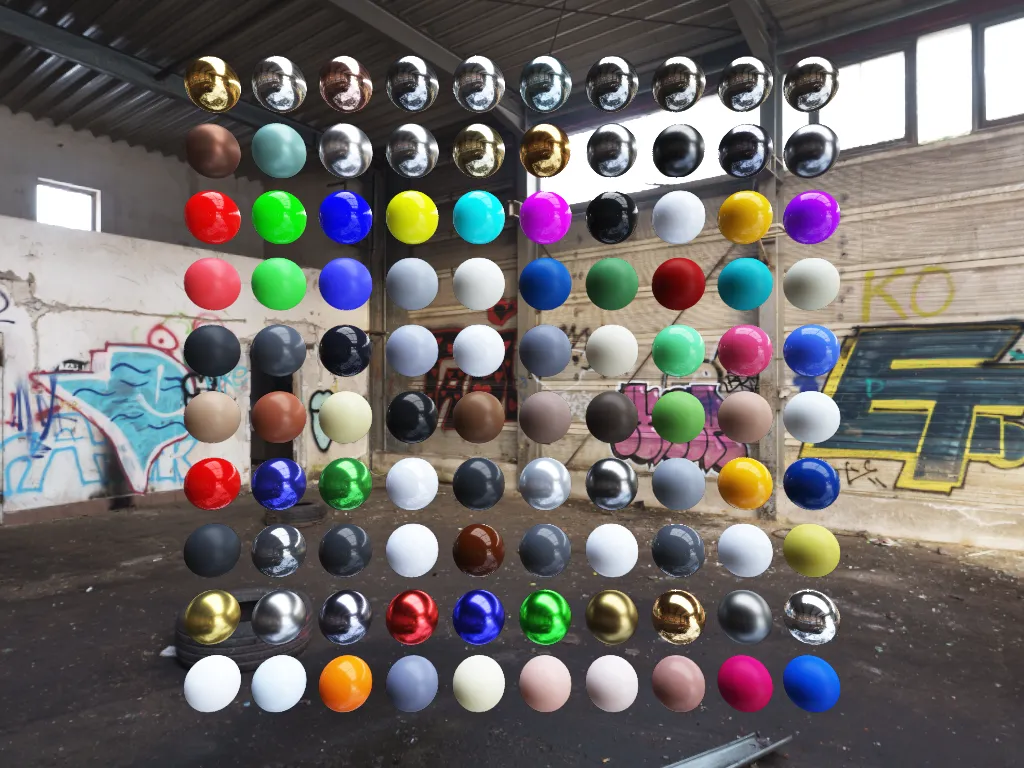 Front |
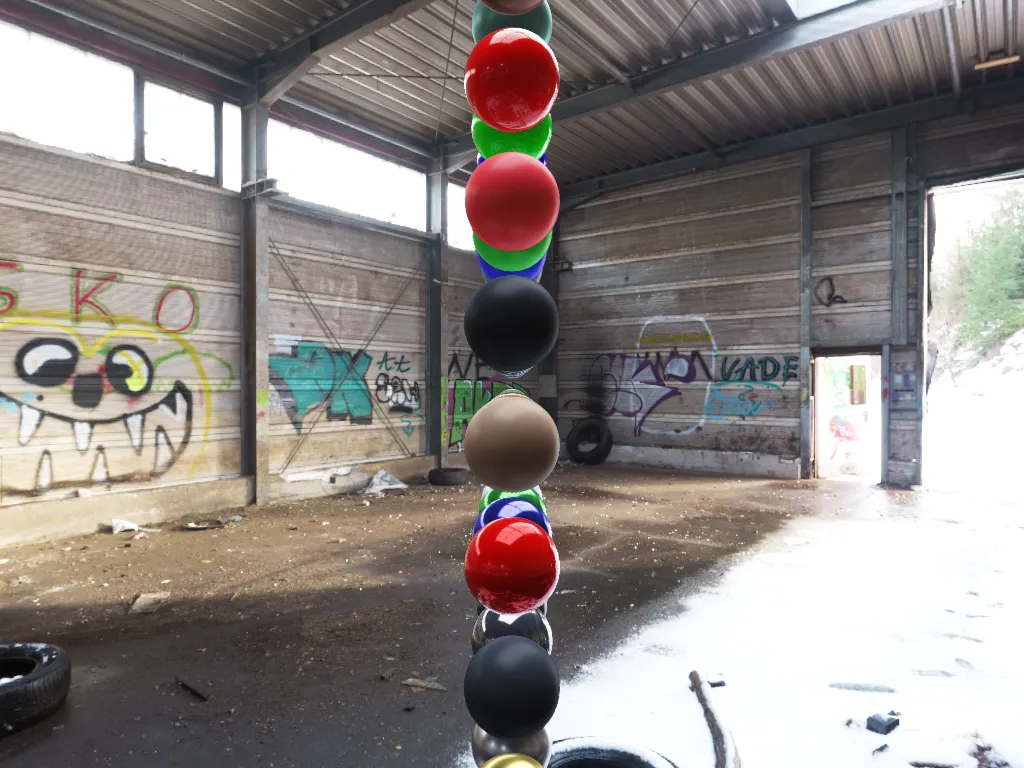 Left |
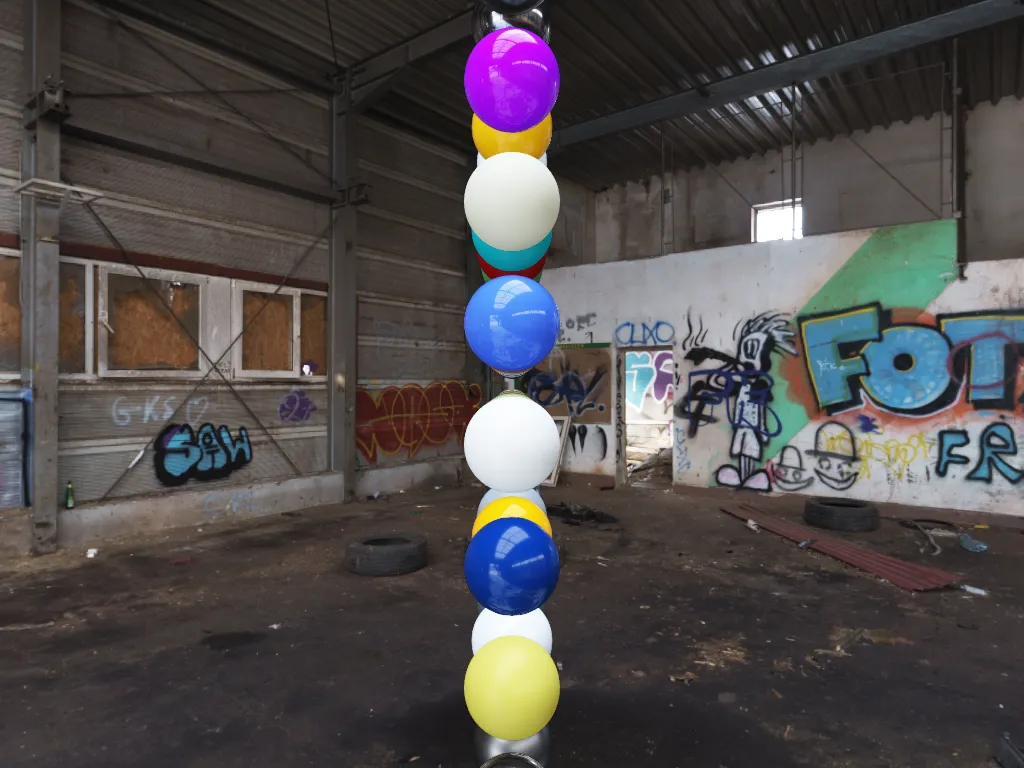 Right |
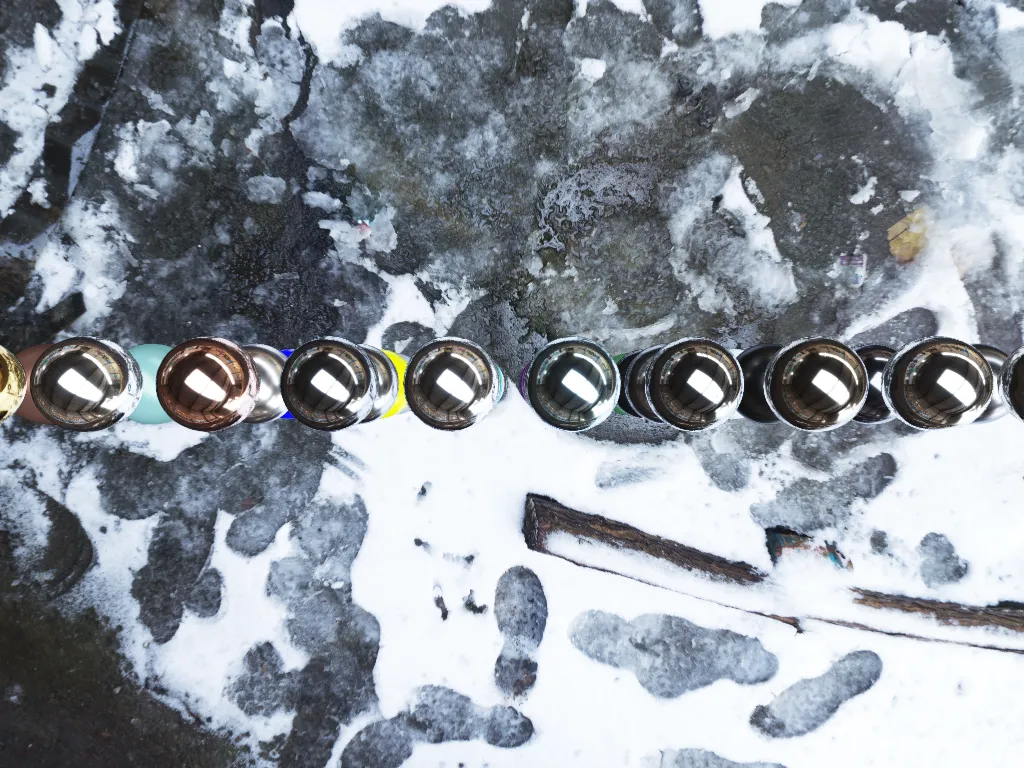 Top |
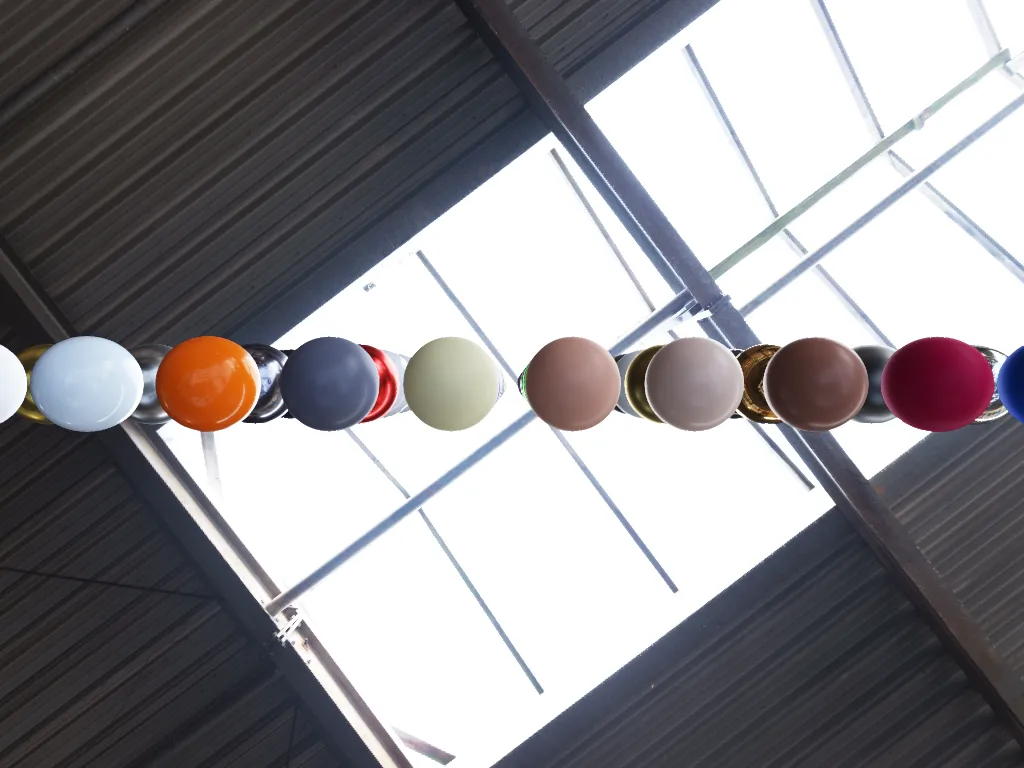 Bottom |
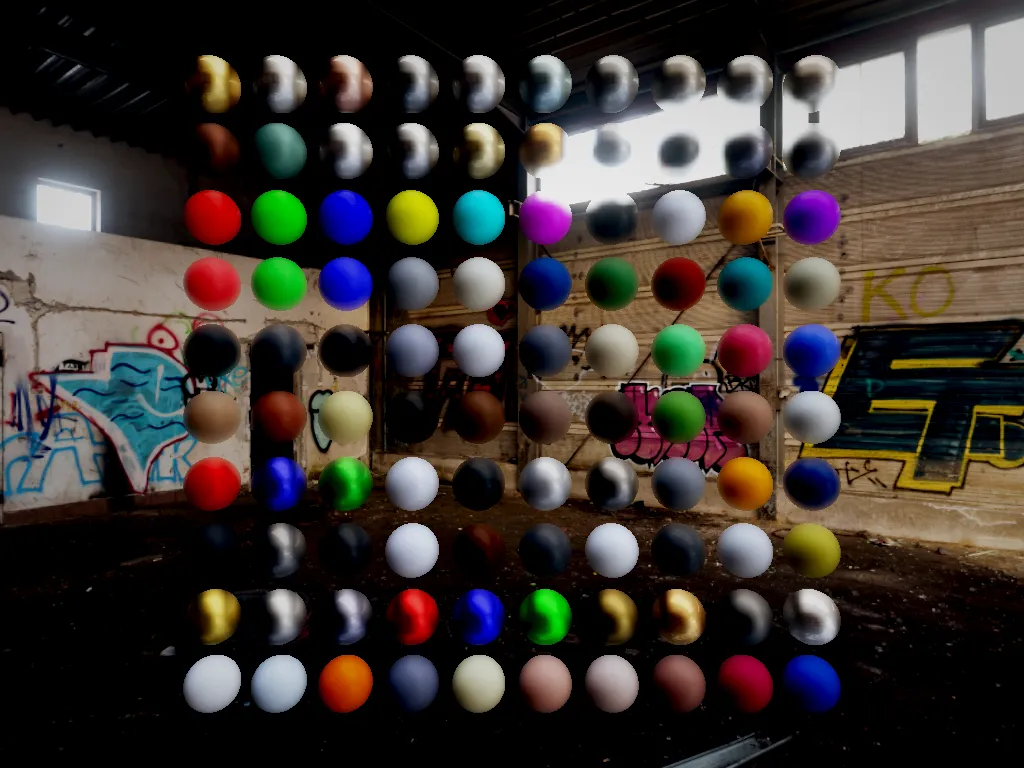 Sony A7S III |
Full Data Flow Pipeline
graph TD
    POLL("① CPU — glfwPollEvents()") --> TIME("② CPU — Δt calculation")
    TIME --> CAM("③ CPU — Camera physics 60Hz")
    CAM --> SORT("④ CPU → GPU — Sphere sorting")
    SORT --> FBO("⑤ GPU — Bind Scene FBO, Clear")
    FBO --> SKY("🌅 Skybox Pass — Equirectangular sampling")
    SKY --> SPHERES("🔮 Billboard Pass — 1 draw call, 100 instances, ray-tracing")
    SPHERES --> BLOOM("✨ Bloom + DoF + Auto-Exposure + Motion Blur")
    BLOOM --> COMP("🎬 Final Composite — 9 textures, UBO, fullscreen quad")
    COMP --> UI("🖥️ UI Overlay + Profiler + Transition")
    UI --> SWAP("⑩ glfwSwapBuffers()")

    classDef cpu fill:#e3f2fd,stroke:#42a5f5,stroke-width:1.5px,color:#2d2d2d
    classDef gpu fill:#fff59d,stroke:#f9a825,stroke-width:2px,color:#2d2d2d
    classDef postfx fill:#f3e5f5,stroke:#ab47bc,stroke-width:1.5px,color:#2d2d2d
    classDef subsystem fill:#ffffff,stroke:#aaaaaa,stroke-width:1.5px,color:#444444

    class POLL,TIME,CAM,SORT cpu
    class FBO,SKY,SPHERES gpu
    class BLOOM,COMP postfx
    class UI,SWAP subsystem
Glossary
Quick reference for technical terms used in this article, with links to official documentation.
Languages, APIs & Standards
| Term | Description | Link |
|---|---|---|
| C11 | 2011 revision of the C language standard, used for the entire engine | cppreference — C11 |
| OpenGL 4.4 | Low-level graphics API for communicating with the GPU | OpenGL 4.4 Spec (Khronos) |
| Core Profile | OpenGL mode that removes deprecated functions (fixed-function pipeline) | OpenGL Wiki — Core Profile |
| GLSL | OpenGL Shading Language — the language for GPU programs (shaders) | GLSL Spec (Khronos) |
| GLFW | C library for creating windows and handling keyboard/mouse input | glfw.org |
| GLAD | OpenGL loader generator — resolves GL function addresses at runtime | GLAD Generator |
| GLX | X11 extension bridging the Window System and OpenGL on Linux | GLX Spec (Khronos) |
| X11 | Historic Linux windowing system (display server) | X.Org |
| Mesa | Open-source implementation of graphics APIs (OpenGL, Vulkan) on Linux | mesa3d.org |
3D Rendering — Core Concepts
| Term | Description | Link |
|---|---|---|
| PBR | Physically-Based Rendering — lighting model that simulates real physics of light | learnopengl.com — PBR Theory |
| IBL | Image-Based Lighting — lighting extracted from a panoramic HDR environment image | learnopengl.com — IBL |
| HDR | High Dynamic Range — color values exceeding 1.0 (realistic light intensities) | learnopengl.com — HDR |
| LDR | Low Dynamic Range — color values 0–255, what the screen actually displays | learnopengl.com — HDR |
| Shader | Program executed directly on the GPU (vertex, fragment, compute) | OpenGL Wiki — Shader |
| Vertex Shader | Shader that processes each geometry vertex (position, projection) | OpenGL Wiki — Vertex Shader |
| Fragment Shader | Shader that computes the color of each on-screen pixel | OpenGL Wiki — Fragment Shader |
| Compute Shader | General-purpose GPU shader outside the rendering pipeline | OpenGL Wiki — Compute Shader |
| Skybox | Panoramic image displayed as scene background (sky/environment) | learnopengl.com — Cubemaps |
| Rasterization | Process of converting 3D triangles into 2D pixels on screen | OpenGL Wiki — Rasterization |
| Draw Call | A CPU→GPU call requesting geometry rendering | OpenGL Wiki — Rendering Pipeline |
| Instanced Rendering | Technique to draw N copies of an object in a single draw call | OpenGL Wiki — Instancing |
| Mipmap | Pre-reduced versions of a texture (½, ¼, ⅛…) for cleaner filtering at distance | OpenGL Wiki — Texture#Mip_maps |
OpenGL GPU Objects
| Term | Description | Link |
|---|---|---|
| FBO | Framebuffer Object — offscreen render surface (draw to it instead of the screen) | OpenGL Wiki — Framebuffer Object |
| MRT | Multiple Render Targets — write to several textures in a single render pass | OpenGL Wiki — MRT |
| VAO | Vertex Array Object — describes the format of geometric data sent to the GPU | OpenGL Wiki — VAO |
| VBO | Vertex Buffer Object — GPU buffer containing vertex positions, normals, etc. | OpenGL Wiki — VBO |
| SSBO | Shader Storage Buffer Object — read/write GPU buffer accessible from shaders | OpenGL Wiki — SSBO |
| UBO | Uniform Buffer Object — data block shared between CPU and shaders | OpenGL Wiki — UBO |
| PBO | Pixel Buffer Object — buffer for asynchronous CPU↔GPU pixel transfers | OpenGL Wiki — PBO |
| Texture View | Alternate view of an existing texture's data (different format or layers) | OpenGL Wiki — Texture View |
Ray-Tracing & Geometry
| Term | Description | Link |
|---|---|---|
| Ray-Tracing | Technique that traces light rays to compute intersections with objects | Scratchapixel — Ray-Sphere |
| Billboard | Screen-facing quad used here as a ray-tracing surface | OpenGL Wiki — Billboard |
| AABB | Axis-Aligned Bounding Box — axis-aligned enclosing box for fast culling | Wikipedia — AABB |
| Icosphere | Sphere built by subdividing an icosahedron (20 faces) — more uniform than a UV sphere | Wikipedia — Icosphere |
| Discriminant | Mathematical value (b²−c) determining whether a ray hits a sphere | Scratchapixel — Ray-Sphere |
| Normal | Vector perpendicular to the surface at a point — determines surface orientation | learnopengl.com — Basic Lighting |
| Tessellation | Subdividing geometry into finer triangles for more detail | OpenGL Wiki — Tessellation |
| Mesh | Collection of triangles forming a 3D object | Wikipedia — Polygon mesh |
| Quad | Rectangle made of 2 triangles — the basic 2D primitive | learnopengl.com — Hello Triangle |
PBR & Lighting
| Term | Description | Link |
|---|---|---|
| BRDF | Bidirectional Reflectance Distribution Function — describes how light bounces off a surface | learnopengl.com — PBR Theory |
| BRDF LUT | Pre-computed texture encoding the BRDF integral for all (angle, roughness) combinations | learnopengl.com — Specular IBL |
| Fresnel-Schlick | Approximation of the Fresnel effect: surfaces reflect more at grazing angles | learnopengl.com — PBR Theory |
| GGX / Smith-GGX | Microfacet model for geometry and normal distribution (roughness) | learnopengl.com — PBR Theory |
| NDF | Normal Distribution Function — statistical distribution of microfacet orientations | learnopengl.com — PBR Theory |
| Albedo | Base color of a material (without lighting) | learnopengl.com — PBR Theory |
| Metallic | PBR parameter: 0 = dielectric (plastic, wood), 1 = metal (gold, chrome) | learnopengl.com — PBR Theory |
| Roughness | PBR parameter: 0 = perfect mirror, 1 = completely matte | learnopengl.com — PBR Theory |
| AO | Ambient Occlusion — darkens crevices and corners (ambient light occlusion) | learnopengl.com — SSAO |
| Dielectric | Non-metallic material (plastic, glass, wood) — reflects little at direct angles | learnopengl.com — PBR Theory |
| Irradiance Map | Texture encoding hemisphere-integrated diffuse ambient light for each direction | learnopengl.com — Diffuse Irradiance |
| Specular Prefilter | Mip-mapped texture encoding blurred reflections by roughness level | learnopengl.com — Specular IBL |
| Equirectangular | 2D projection of a sphere (like a world map) — the format of .hdr images |
Wikipedia — Equirectangular |
| SH Probes | Spherical Harmonics — compact representation of a low-frequency light field | Wikipedia — SH Lighting |
Post-Processing
| Term | Description | Link |
|---|---|---|
| Bloom | Glow halo around very bright areas (lens light diffusion) | learnopengl.com — Bloom |
| Depth of Field (DoF) | Blur of objects outside the focus distance | Wikipedia — Depth of field |
| CoC | Circle of Confusion — blur disc diameter for an out-of-focus point | Wikipedia — CoC |
| Bokeh | Aesthetic shape of background blur (discs, hexagons…) | Wikipedia — Bokeh |
| Motion Blur | Per-pixel motion blur simulating a camera shutter | GPU Gems — Motion Blur |
| FXAA | Fast Approximate Anti-Aliasing — fast post-process anti-aliasing on the final image | NVIDIA — FXAA |
| MSAA | Multisample Anti-Aliasing — geometric anti-aliasing (expensive, avoided here) | OpenGL Wiki — Multisampling |
| Tonemapping | Conversion of HDR colors (unbounded) to displayable LDR (0–255) | learnopengl.com — HDR |
| Color Grading | Creative color adjustments (saturation, contrast, gamma, hue) | Wikipedia — Color grading |
| 3D LUT | 3D color lookup table for a cinematic "look" (.cube file) |
Wikipedia — 3D LUT |
| Vignette | Progressive darkening of image edges (lens effect) | Wikipedia — Vignetting |
| Dithering | Adding imperceptible noise to break banding artifacts in gradients | Wikipedia — Dither |
| Auto-Exposure | Automatic scene brightness adaptation (simulates the eye's iris) | learnopengl.com — HDR |
| VSync | Vertical Sync — syncs rendering with screen refresh (prevents tearing) | Wikipedia — VSync |
Architecture & Performance
| Term | Description | Link |
|---|---|---|
| SIMD | Single Instruction, Multiple Data — vector computation (1 instruction processes 4+ values) | Wikipedia — SIMD |
| SSE | Intel/AMD SIMD extensions for x86 (128-bit registers) | Intel — SSE Intrinsics |
| NEON | ARM SIMD extensions (smartphones, Apple Silicon, Raspberry Pi) | ARM — NEON |
| VRAM | Dedicated GPU memory — where textures and buffers reside | Wikipedia — VRAM |
| DMA | Direct Memory Access — data transfer without CPU involvement | Wikipedia — DMA |
| Cache-friendly | Memory layout that minimizes CPU cache misses (contiguous data) | Wikipedia — Cache |
| LRU Cache | Least Recently Used — cache that evicts the least recently used entry | Wikipedia — LRU |
| Fence (GLSync) | GPU sync object — lets you wait for GPU work to complete | OpenGL Wiki — Sync Object |
| Memory Barrier | GPU instruction ensuring previous writes are visible before subsequent reads | OpenGL Wiki — Memory Barrier |
| Work Group | Group of GPU threads executed together in a compute shader (e.g. 16×16 = 256 threads) | OpenGL Wiki — Compute Shader |
| Dispatch | CPU call that launches a compute shader on the GPU | OpenGL Wiki — Compute Shader |
Mathematics & Camera
| Term | Description | Link |
|---|---|---|
| mat4 / vec3 | 4×4 matrix and 3D vector — fundamental 3D types | cglm docs |
| FOV | Field of View — camera viewing angle (60° here) | Wikipedia — FOV |
| View Matrix | Transforms world coordinates into camera coordinates (lookAt) |
learnopengl.com — Camera |
| Projection Matrix | Transforms 3D to 2D with perspective (far objects = smaller) | learnopengl.com — Coordinate Systems |
| Yaw / Pitch | Yaw = left-right rotation, Pitch = up-down rotation of the camera | learnopengl.com — Camera |
| Lerp | Linear Interpolation — smooth transition between two values: a + t × (b − a) |
Wikipedia — Lerp |
| EMA | Exponential Moving Average — weighted average favoring recent values | Wikipedia — EMA |
| Smoothstep | S-curve interpolation function (smooth transition between 0 and 1) | Khronos — smoothstep |
| Z-buffer / Depth Buffer | Texture storing per-pixel depth to handle occlusion | learnopengl.com — Depth Testing |
| Stencil Buffer | Per-pixel mask restricting rendering to specific areas | learnopengl.com — Stencil |
Sorting Algorithms
| Term | Description | Link |
|---|---|---|
| Bitonic Sort | Parallel sort suited for GPUs — compares and swaps in pairs | Wikipedia — Bitonic sort |
| Radix Sort | Sort by successive digits — O(n·k), efficient on CPU for integer keys | Wikipedia — Radix sort |
| Back-to-front | Rendering order from farthest to nearest, required for correct transparency | Wikipedia — Painter's algorithm |
Multithreading
| Term | Description | Link |
|---|---|---|
| POSIX Threads | Standard threading API on Unix/Linux (pthread_create, pthread_cond_wait) |
man — pthreads |
| Async Loading | Running disk I/O on a separate thread to avoid blocking the render loop | Wikipedia — Async I/O |
| Condition Variable | Sync mechanism: a thread sleeps until another signals it | man — pthread_cond_wait |
Miscellaneous
| Term | Description | Link |
|---|---|---|
| Tracy | Real-time profiler for games and graphics apps (per-frame CPU + GPU measurement) | Tracy Profiler (GitHub) |
| cglm | SIMD-optimized C math library for 3D (matrices, vectors, quaternions) | cglm (GitHub) |
| stb_image | Single-header C library for loading images (PNG, JPEG, HDR…) | stb (GitHub) |
| Fixed Timestep | Physics update at a constant interval (e.g. 60 Hz) regardless of framerate | Fix Your Timestep! (Fiedler) |
| Game Loop | Main application loop: read input → update → render → repeat | Game Programming Patterns — Game Loop |
| Fireflies | Ultra-bright aberrant pixels caused by extreme HDR values (artifact) | Physically Based — Fireflies |
| Premultiplied Alpha | Convention where RGB is already multiplied by alpha — enables correct blending | Wikipedia — Premultiplied alpha |
Conclusion
suckless-ogl demonstrates that a complete PBR engine can be built with readable C11 code, a clear rendering pipeline, and GPU performance measured in milliseconds. The design choices — billboard ray-tracing instead of meshes, async HDR loading, progressive IBL, modular post-processing — show how to solve real graphics problems with elegance.
The full source code is available on GitHub, and the detailed technical documentation at yoyonel.github.io/suckless-ogl.
In upcoming articles, we'll explore the Vulkan and NVRHI projects that push these concepts even further.