Sphere Rendering: Transparency and Analytic Anti-Aliasing
This document details the "High Quality" rendering implementation for sphere instances (impostor billboards), including CPU sorting for correct transparency and an analytic anti-aliasing technique for perfect edges.
1. Sphere Sorting (Transparency)
To correctly handle Transparency Alpha Blending (GL_SRC_ALPHA, GL_ONE_MINUS_SRC_ALPHA), objects must be drawn from furthest to closest (Back-to-Front) relative to the camera.
BillboardSorter Architecture
The sorting system is encapsulated in the dedicated BillboardSorter component (include/billboard_sorter.h / src/billboard_sorter.c).
- Data:
- Instances (
SphereInstance) are stored contiguously in the scene/renderer. BillboardSorterallocates and manages CPU sorting scratchpads (entriesof typeBillboardSortEntrycontaining{ original_index, depth },entries_auxfor Radix Sort, andtemp_instancesfor reordered CPU buffers) as well as GPU compute resources (compute shader programs, uniforms cache, and sort buffers) for GPU Bitonic Sort.
- Instances (
- Algorithm:
- Each frame, the squared distance (
glm_vec3_distance2) between the camera and each sphere is calculated. - Standard
qsortor CPU Radix Sort is used to sortBillboardSortEntrykeys by descending depth (Back-to-Front). - A temporary sorted instance buffer is reconstructed.
- Each frame, the squared distance (
- SIMD Optimization:
- Instance buffers are allocated via
aligned_allocwith 64-byte alignment (SIMD_ALIGNMENT) to optimize memory access and enable potential AVX vectorization.
- Instance buffers are allocated via
Rendering Pipeline
If the USE_TRANSPARENT_BILLBOARDS macro is enabled and "Transparent" mode is active (Key T):
1. Skybox Render (First, depth write).
2. Decoupled Sort via billboard_sorter_sort(&renderer->sorter, instances, count, camera_pos, mode).
3. Upload & Draw via billboard_renderer_draw(&renderer, profiler, ¶ms). The renderer binds instance storage buffers, configures PBR uniforms, and draws spheres with Blending enabled and Depth Write disabled (Read-Only).
Ray-Tracing Diagram
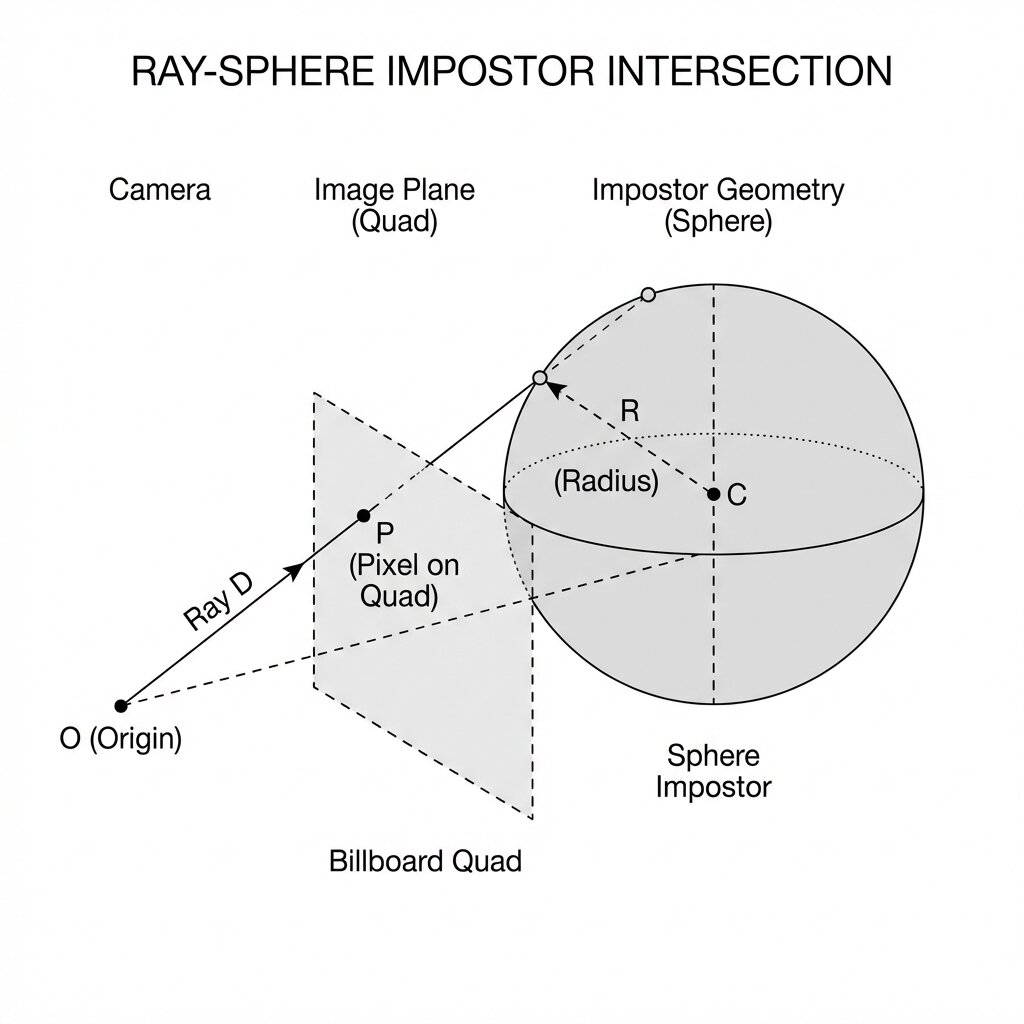

2. Analytic Anti-Aliasing ("Perfect AA")
The spheres are not real 3D geometry but Impostors (2D Billboards on a Quad). The exact sphere rendering is calculated mathematically for each pixel in the Fragment Shader (pbr_ibl_billboard.frag).
The Aliasing Problem
If we brutally "cut" the pixel when the ray misses the sphere (discard if discriminant < 0), we get very visible jagged edges (aliasing). MSAA does not work well here because to the GPU, it's a flat Quad.
Solution: Discriminant Smoothing
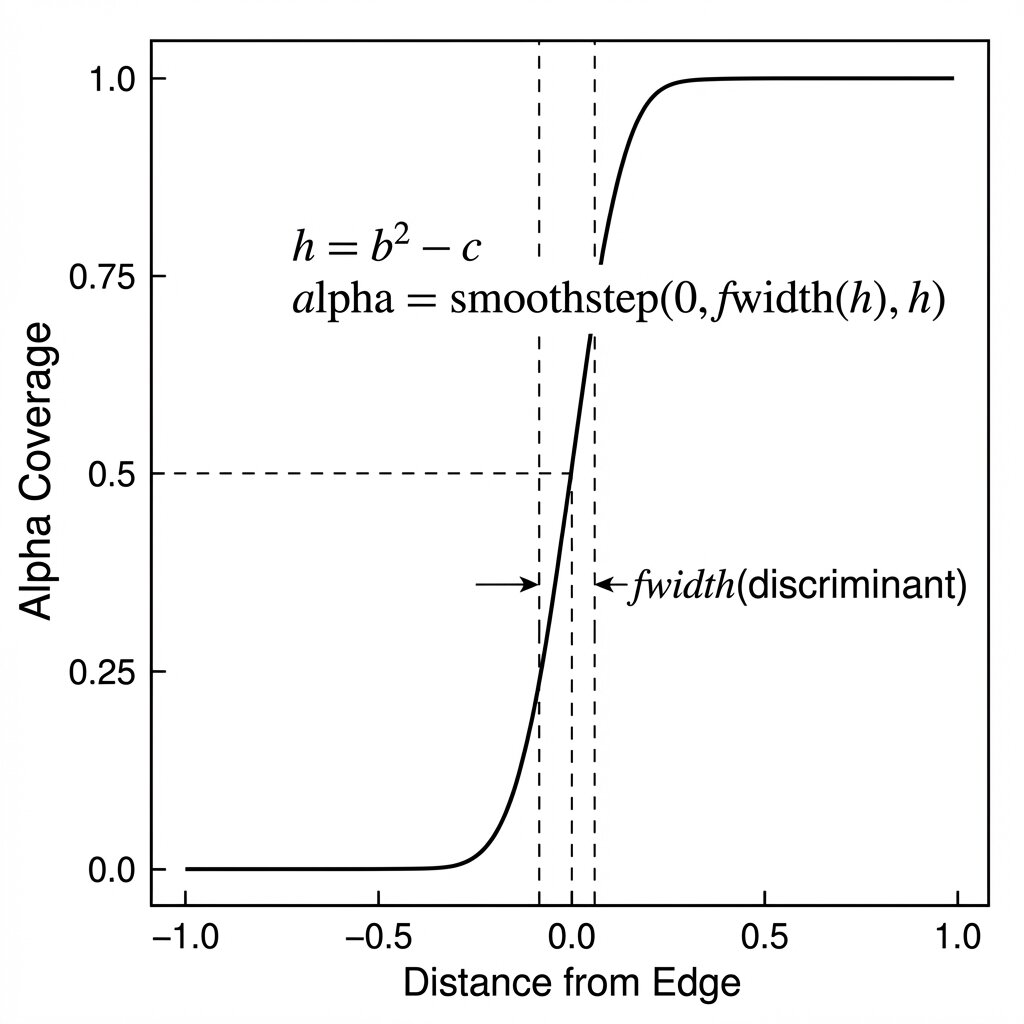
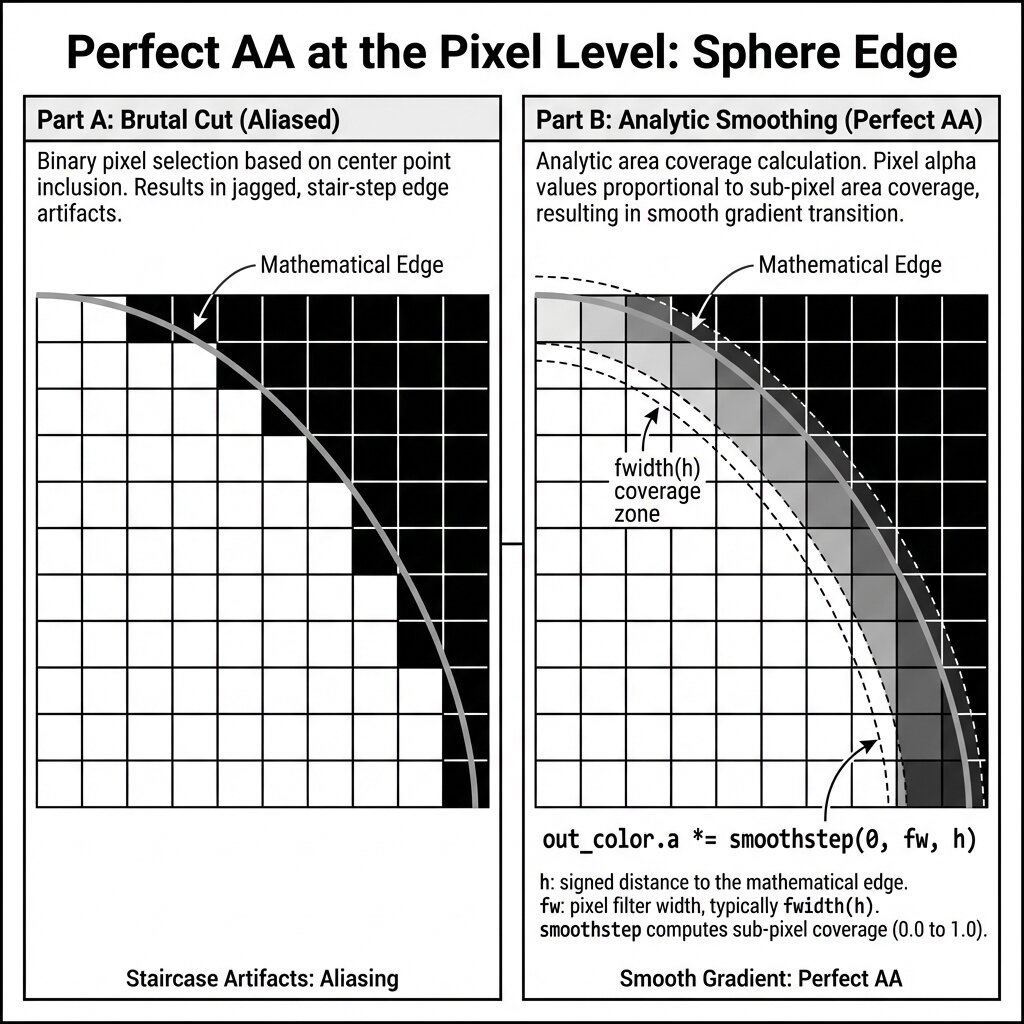
The Ray-Sphere intersection equation gives a discriminant (Delta or h). - h > 0: Intersection (inside sphere). - h < 0: No intersection (outside sphere). - h approx 0: Exact sphere edge.
To smooth the edge, we use the derivative of the distance function to estimate pixel coverage:
// Analytic intersection calculation
float discriminant_val = b*b - c; // Discriminant

// If discriminant_val < 0, we are outside.
// But close to 0, we want a gradient (alpha transition).

// fwidth(discriminant_val) gives the variation across the pixel width.
// This allows normalizing to know "what fraction of a pixel" we are from the edge.
float edge_factor_val = smoothstep(0.0, fwidth(discriminant_val), discriminant_val);

// Apply this factor to alpha or final color
out_color.a *= edge_factor_val;
edge_factor_val darkens (or makes transparent) pixels that straddle the mathematical edge of the sphere, producing analytically perfect anti-aliasing, independent of resolution.
3. Configuration & Macros
The behavior is controlled by the USE_TRANSPARENT_BILLBOARDS macro defined in include/app_settings.h (automatically injected into shaders).
- "Legacy-Calculation" Mode (Macro undefined):
- Opaque Rendering (Depth Test/Write ON).
- No sorting.
- Alpha used to store Luma (FXAA optimization).
- "Transparent-Rendering" Mode (Macro defined + Key T):
- Transparent Rendering (Blend ON, Depth Write OFF).
- Back-to-Front sort every frame.
- Alpha used for opacity (True Transparency).
- FXAA recalculates Luma from RGB.